Category: Project Control

  • Safety results of PMO practices

    Safety results of PMO practices

    Quality control and safety are increasingly important concerns for project managers. Defects or failures in constructed facilities can result in very high costs. Even minor defects may require reconstruction and affect plant operations. 

    In a worst-case scenario, defects can result in personal injury or death. Accidents during the construction process can also result in personal injury and high costs. Indirect costs for insurance, inspection, and regulation increase rapidly due to these increased direct costs. 

    Good project managers try to ensure that the job is done right the first time and that there are no serious accidents on the project.

    As with cost control, the most important decisions about the quality of a completed facility are made during the design and planning phases, not during construction. During these preliminary phases, component configuration, material specifications, and functional performance are determined. 

    Quality control during the construction phase consists largely of ensuring consistency with these initial design and planning decisions.

    Although conformance to existing design decisions is the primary focus of quality control, there are exceptions to this rule. 

    First, unforeseen circumstances, incorrect design decisions, or owner-requested changes in facility function may require reevaluation of design decisions during construction. While these changes may be motivated by a concern for quality, they represent opportunities for redesign with all the associated goals and constraints. 

    Inspectors and quality assurance personnel are involved in a project and represent a variety of different organisations. Each of the parties directly involved in the project may have their own quality and safety inspectors, including the owner, the engineer or architect, and the various construction contractors. 

    These inspectors may be contractors from specialised quality assurance organisations. In addition to on-site inspections, material samples are typically tested by specialised laboratories to ensure compliance. 

    Inspectors who verify regulatory compliance are also involved. Common examples include inspectors from the local building inspectorate, environmental authorities, and occupational health and safety authorities.

    Construction is a relatively hazardous endeavour. There are substantially more lost work days due to injuries or illnesses in construction than in virtually any other industry. Also, these work-related injuries and illnesses are extremely costly. 

    Unlike most industrial accidents, construction accidents can also injure uninvolved persons. Several crane collapses of high-rise buildings under construction have resulted in the deaths of passersby. Prudent project managers and builders want to reduce accidents, injuries and illnesses as much as possible.

    Safety practices for the Project Management offices should consider insurance premiums costs for individuals. Additionally, they should also have safety and health teams doing audits and inspections at regular intervals during the construction phase.

    Delays caused by injuries and illnesses can be a significant opportunity cost for owners. As we see with modern-day construction planning, inspection activities are included in the schedule. 

    Each of these activities have owners and health and safety report templates are an important part of the documentation. PMO sets baselines and acceptable limits for safety issues. 

    At every phase gate, these parameters are re-checked and discussed with primary stakeholders. It is important that the construction crew knows about these parameters and there is regular safety training conducted to keep them informed. These affect the risk management strategies directly. Most construction companies also publish these reports to the public for awareness and we have seen a significant reduction in accidents and cost overruns in the past decade.

    Never ignore quality control and safety practices

    Quality control and safety are crucial aspects of project management in the construction industry. They affect the costs, performance, and reputation of the constructed facilities. Quality control and safety require careful planning and design, as well as consistent implementation and monitoring during the construction phase.

    These practices are the responsibilities of all project participants and should be prioritised throughout the project lifecycle, and project controls consultancy can help make it happen.
  • Powering Your Projects with Primavera P6 and Power BI

    Powering Your Projects with Primavera P6 and Power BI

    Construction, manufacturing, energy, and IT businesses rely on accurate project planning and execution to be successful. Primavera P6 is a powerful tool for project managers, but it can be difficult to get the most out of its capabilities without help from experts. Fortunately, Power BI can provide the insights you need to make the most of your Primavera data. Let’s take a look at how these two technologies can work together to improve your projects.

    Introducing Primavera P6 and Power BI

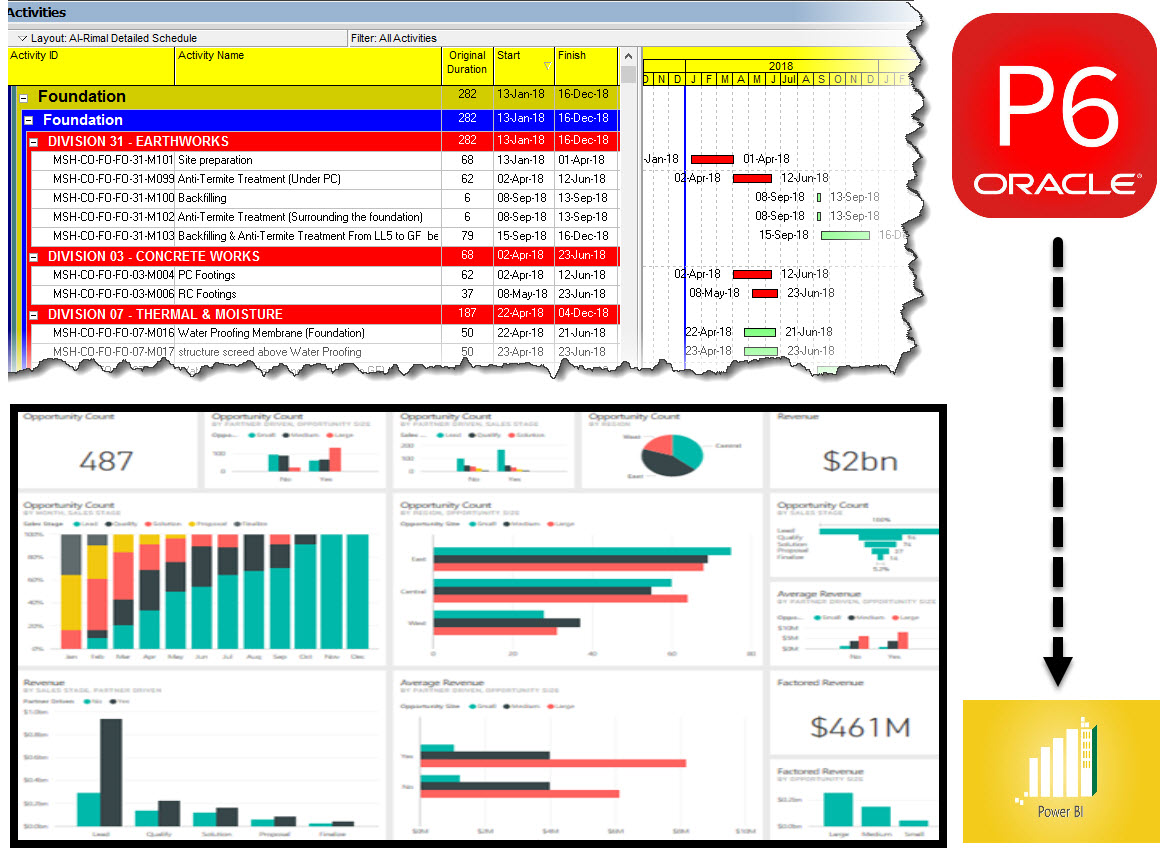
    Primavera P6 is a construction management software application that enables users to schedule and track construction projects. The software is used by project managers and planners to create and monitor project schedules, resources, budgets, and risks. Power BI is a business intelligence tool that helps users to visualize and analyze data. The two tools can be used together to provide insights into construction projects. For example, Power BI can be used to create visualizations of project data that can be used to identify trends and areas for improvement. Primavera P6 can then be used to create detailed schedules and resources plans based on these insights. Together, these tools can help construction professionals to better manage their projects and improve their results.

    What data can be extracted from Primavera P6 and analyzed in Power BI?

    Power BI is a Microsoft business analytics tool that can be used to extract data from various sources in order to create interactive visualizations and reports. One such data source is Primavera P6, a construction project management software. By connecting Power BI to Primavera P6, users can gain insights into their construction projects that would otherwise be unavailable. For example, Power BI can be used to track the progress of individual tasks, identify bottlenecks in the project timeline, and predict when the project will be completed. In addition, Power BI can also be used to monitor resource usage and identify areas where cost savings can be achieved. By harnessing the power of Power BI, construction managers can gain a better understanding of their projects and make more informed decisions.

    How to create reports and dashboards with Primavera P6 data in Power BI

    The first step is to connect to your Primavera P6 database using the Power BI Desktop application. Once you have connected to the database, you will be able to select the data that you want to include in your report or dashboard.

    Once you have selected the data, you can then start to create your visualizations. Power BI provides a wide range of visualization options, so you can tailor your reports and dashboards to meet your specific needs. For example, you could create a bar chart to track project progress, or a pie chart to compare costs across different project phases.

    Once you have created your visualizations, you can then publish your reports and dashboards to the Power BI service, where they can be shared with others in your organization. Publishing to the Power BI service also allows you to take advantage of features such as scheduled refresh, which ensures that your reports and dashboards are always up-to-date with the latest data from Primavera P6.

    Tips and tricks for getting the most out of Primavera P6 and Power BI Integration

    Here are some tips and tricks for getting the most out of Primavera P6 and Power BI:

      • Use Power BI to create custom reports for your Primavera P6 data. This way, you can easily visualize important information and identify trends.

      • Take advantage of the Data Model Explorer in Power BI to better understand the relationships between different data sets.

      • Use the Query Editor in Power BI to transform and cleanse your data before creating reports or dashboards.

      • Use conditional formatting in Power BI to highlight key data points or visually flag issues.

    By following these tips, you can get the most out of Primavera P6 and Power BI. With these tools at your disposal, you’ll be able to manage your projects more effectively and make better decisions for your business.

    So, there you have it- a quick introduction to Primavera P6 and Power BI. I hope this has given you some ideas about the kinds of reports and dashboards you can create with data from your projects in Primavera P6. In future posts, we’ll explore more specific topics related to working with Primavera data in Power BI, so stay tuned! If you have any questions or comments on this topic, please let me know in the comments below.

  • Types of Oracle Primavera Cloud Licenses

    Types of Oracle Primavera Cloud Licenses

    Oracle Primavera Cloud is for managing projects effortlessly on Oracle’s Most Modern Project Management Platform, it’s a most modern and broader project management platform in the market which still combines some very powerful and unique tools.

    Types of Licenses

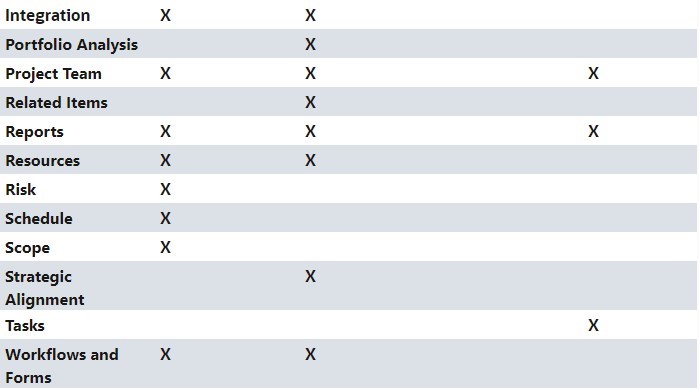
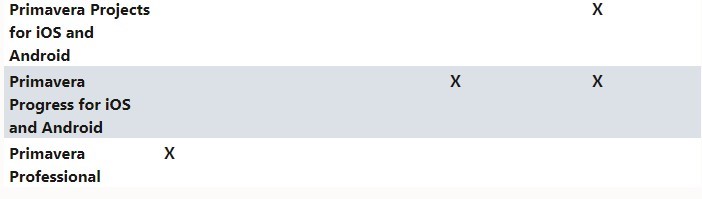
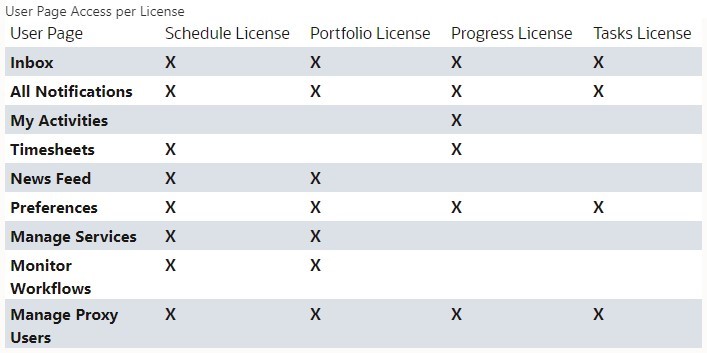
    There are four licenses designed to meet the needs of your organization. Licenses determine what apps, pages, functionality, and mobile apps a user has access to.

    Schedule License: For power schedulers to prioritize, plan, manage, and evaluate projects across your organization.
    Portfolio License: For portfolio planners to propose and manage the portfolios across your organization.
    Progress License: For users who only need access to their activities and timesheets.
    Tasks License: For schedulers that use task management to manage their projects.

    Licenses are distributed according to the license model:

    • Licenses are distributed according to the license model:
    • If you have the Named Users license model, then you will assign available licenses to users.
    • If you have the Project license model, then all users will automatically receive the Schedule license, the Tasks license,
    • and the Progress license.
    • If you have the Enterprise Schedule license model, then all users will automatically receive the Schedule license, the Tasks license, and the Progress license.
    • If you have the Enterprise Portfolio Planning license model, then all users will automatically receive the Portfolio license.

    The tables below highlight which apps, pages, functionality, and mobile apps come with which licenses. Users may still require additional security privileges before they can access the apps, pages, functionality, or mobile apps granted by their license assignment.

    license assignment
    unctionality
    access the apps
     apps, pages, functionality
    Progress license
  • How to prepare a construction programme that works

    How to prepare a construction programme that works

    A good construction programme is essential for the control mechanism of any construction project. Here we highlight the important tips in the form of a checklist that covers all the important elements to consider while preparing a construction programme that will yield positive outcomes.

    In order for the construction owners to appropriately monitor progress, the contractor should submit programmes showing the sequence, method, and timing proposed for the execution of works and against which actual and forecast progress of the works can be monitored and assessed. 

    Such programmes shall include the Works Programme (and the more detailed programmes to be extracted therefrom), Price Time Curves, and all other programmes that are identified in the particular specification or as instructed by the project manager of the employer.

    12 critical elements of the work programme which you should never miss

      • Starting date, access dates, key dates and completion dates are the most important elements of the construction works programme to verify it with the contract documents to get it right.

      • Time schedule available in a format that can be interrogated (Primavera P6 format provided, or other agreed software)

      • The order and timing of the operations that the Contractor plans to provide the works.

      • The order and timing of the work of the employer and other contractors as last agreed with them by the contractor as stated in the works information.

      • The dates when the contractor plans to meet each condition stated for the key dates and to complete other work needed to allow the employer and other contractors to do their work.

      • Access and availability dates along with the dates of employers’ acceptances.

      • programme divided into sufficient activities to cover the scope of works defined in the particular specification where each activity should be less than either 28 days or the frequency of the reporting whichever is lesser (except manufacturing activities).

      • Key dates and milestone dates should be clearly indicated.

      • Level of resource in tabular and/or histogram format provided with the submitted programme.

      • Other critical dates indicated (such as power-on dates, expected statutory submissions, inspection/approval dates, etc.)

      • All principal submissions required under the contract identified (such as quality plans, safety plans, programmes, method statements, design documents and other deliverables)

      • Interface dates as per interfacing schedule indicated.

    “Keep your schedule as simple as possible; thus enter the minimum amount of information into your schedule that is required to meet management and reporting needs, which in turn will make the schedule simpler to create, change and update.”

    Paul Harris, Director, Eastwood Harris Pty Ltd

    What to include with your works programme submission?

    Your Works Programme should be accompanied with the following information:

      • Cross-referenced to accompanying method statements (or previously submitted method statement)

      • Programme narrative provided as per expectations laid out in the contract specification. Usually, this includes an explanation of cycle times and work sequences, deployment of labour and contractor’s equipment, production rates in identifying durations, breakdown of labour requirements by trade, leads and lags in logic, schedules of quantities used in developing the programme and shifts assumed etc.

      • Analysis report identifies all activities and events that are critical or have negative float (or have very nominal positive float), and shall assess the risk of any impact on the programme and on the achievement of key dates. The contractor shall identify all the steps being taken to minimise such risks.

      • Programme narrative cross-referenced to mobilisation and logistics plan.

      • Price Line Curve: It shall be derived from the pricing document and the works programme should show in graphical and tabular form the anticipated cumulative price of work done over time as a percentage of each cost centre value.

    How to organise your works rogramme?

    When organising your works programme for systematic work assessment and progress reporting, consider following steps below. 

    First, you should indicate the activity duration, early and late dates schedules, and total float in the programme bar chart. This will help you to see the critical path and the slack time of each activity. 

    Use discrete and understandable activity descriptions that clearly define the scope and deliverables of each activity. Then, you should organise the activity in a logical work breakdown structure that includes work phases, and code each activity to indicate the relevant cost centre, phase of the work, area, facility, or location, and workgroup responsible for the activity. This will help you to group and filter the activities according to different criteria. 

    Finally, you should complete the programme setup with appropriate layouts, filters, etc. (such as resource histograms) that will help you to display and analyse the programme in different ways.

    Planning Best Practices while making a complex construction Programme – Do’s and Don’ts

    “First and foremost, a programme is a way of communicating the project plan. The programme is, therefore, a dynamic management tool that should be updated as the project plan changes over the life of the project and re-communicated to the project stakeholders to facilitate effective decision making.”

    Adam Zantis (BBCM, JD) Director, Zancon

    From our experience we consider below points as the planning best practices for construction works programme,

      • A reasonable number of activities provided and without confusing programme logics.

      • Each activity with a unique description without confusion to others.

      • Constraints – the programme should have no mandatory constraints and minimum use of other constraints.

      • No out of sequence activities or broken logic is a big no-no.

      • Use of excessive long leads/lags is not recommended.

      • Use of negative lags is not recommended.

      • Use of start to finish links is not recommended.

      • Links to/from summary taskbars (or level of effort activity) is not recommended.

      • Full end to end logics (no un-linked activities except start and finish activity).

      • Programme should be compliant with relevant activity calendar and week numbering conventions.

      • Programme should be loaded with key resource items and monetary values as per the tendering line items to match the cost code values in the tender.

      • Except for manufacturing works, an activity that exceeds 4 weeks in duration has to be divided into further sub-activities.

      • Always identify time constraints, resource constraints and time risk allowance, if any.

    It is guaranteed that if you follow even 90% of the above mentioned items as a thorough checklist you will definitely get your programme approved from the employer with some minor comments if any. If you want to improve programme management even more, get in touch with us for project controls consultancy

  • What’s New in Primavera P6 Version 20?

    What’s New in Primavera P6 Version 20?

    New Features in Primavera P6 EPPM Version 20.12 explained in detail

    Oracle announced its Primavera P6 EPPM Version 20.12 just before Christmas 2020! So what’s new? Let’s jump straight in…

    So the major spotlight features introduced in Version 20.12 of Primavera P6 EPPM were as follows:

    A Quicker Way to Customize Grids:
    The column menu is an intuitive and simple way to customize grids in the EPS, Activities, and Assignments pages. The drop down menu available in the heading of each column allows you to customize grouping and sorting, remove columns from the view, and rename columns. You can also pin columns to the start of the list, snap each column’s width to fit its contents, and find and replace text within a column.

    Categorize and Organize Assignments Using Codes:
    With potentially many thousands of active resource and role assignments across hundreds of projects, assignment codes provide another method for grouping, sorting, and filtering the assignments you need to access quickly.

    Financial Period Calendars Allow You to Use Different Financial Periods for Different Projects:
    You can create multiple financial period calendars with different periods. The different financial period calendars can have different durations as well as different start and end dates to each period, so you can have one calendar with financial periods of four weeks duration, another with weekly financial periods, and yet another with financial period calendars aligning with calendar months.

    You can create new financial period calendars from scratch or duplicate an existing calendar as the basis for a new financial period calendar. Chose one financial period calendar to be the default for new projects and projects imported without a financial period calendar specified in the import file.

    Easily see which projects are using any financial period calendar and assign financial period calendars to your views to ensure data is spread according to the correct calendar for the project.

    Choose How Start Time is Recorded When a Team Member Starts a Not Started Activity:
    You can control how start time is recorded when a team member starts an activity or assignment in P6 Team Member Web, P6 for Android, or P6 for iOS for the first time on any activity or assignment with a scheduled start earlier than the current date and time.

    An application-wide setting allows you to specify whether the start time should be recorded as the start of the calendar work period, the start of the day (that is midnight on the scheduled start date), or the time at which the team member clicked the Start button.

    Continue to Work in P6 Professional When no Network Connection is Available:
    Offline mode extends the Primavera Cache Service to allow users to continue working in P6 Professional while their internet connection is unavailable. When internet connectivity is restored, users can reconnect to the cloud and P6 Professional will synchronize the data in the local cache database with the Cloud Connect database. Users can also choose to work offline and reconnect to the cloud as and when it is convenient.

    Exception Site List option added to the General Page of the Application Settings pane:
    With this option, you can specify a list of websites that users can click on directly and launch from user-defined fields (UDFs), projects websites, Notebook topics, and Team Member Web. For websites not included in
    the list, users can copy and paste them into their browser and launch them manually.

    Categorize and Organize Activities and Assignments Using Role Codes:
    With potentially hundreds of roles being used across an enterprise of projects, role codes provide another method for filtering the roles you need to access quickly, or for grouping, sorting, and filtering roles and role assignments.

    Role Prices Can Vary Over Time:
    The Prices and Limits detail windows of the role administration page
    have been combined as the Units and Prices detail window. Each effective date can change not only the work limit (also known as Max Units/Time) but each of the rates for the role (also known as Price/Unit).

    Withdraw a Timesheet After Submission:
    In Team Member Web you can withdraw a timesheet you have submitted if it has not yet been approved or rejected. Withdrawing a timesheet allows you to make changes or updates to the hours you have recorded.

    User Defined Field Detail Windows:
    You can view, assign, edit, and delete the UDF assignments for activities, WBS nodes, projects, EPS nodes, resources, resources assignments, issues, and risks in a detail window.

  • Best PMO Systems  Solutions for Construction

    Best PMO Systems Solutions for Construction

    Oracle’s Primavera products are the leading construction program management solutions for the industry.For more than 25 years, Primavera solutions have helped construction, architecture, and engineering firms effectively plan, manage, control, and deliver projects on time and within budget.

    Whatever the size of a project, Oracle’s Primavera enterprise project portfolio management solutions will:

      • Effectively manage time, costs, resources, contracts, and changes in a single solution.

      • Get timely, accurate data for optimum decision-making.

      • Access information any time, anywhere.

      • Respond in real time to changing conditions.

      • Prevent and protect against claims.

      • Track and evaluate subcontractor performance.

      • Capture and standardize best practices.

      • Improve operational efficiency.

      • Reduce performance risk.

      • Proactively manage projects.

      • Accurately forecast to completion.

      • Improve project team collaboration.

      • Develop, capture, and implement the right risk mitigation strategies.

  • Control Cost Using P6: Earned Value Management

    Control Cost Using P6: Earned Value Management

    Cost is one of the triple constraints in project management and one of the most important of every project. While challenging to manage and control, not impossible and there are many tools and methods out there to help you.

    One of the most accepted tools is the Earned Value Management system that can capture project health and performance easily. The process incorporates project progress, schedule and costs, so you can project and analyze how the overall project is performing.

    The following paragraphs provide basic and general knowledge about EVM and how costs are controlled when the EVM gets implemented.

    Earned Value Management Terms

    Let’s start by defining the terms used during the process and what they mean, so you can properly understand the methodology.

    • Planned Value (PV) represents the budgeted cost of the work. In Microsoft Projects and other tools, it’s also known as the budgeted cost of work scheduled (BCWS). In other words, it represents the money to be spent in the project on a given task or overall project.
    • Actual Costs (AC) is the cost incurred for the work already completed. It can also be known as the actual cost of work performed (ACWP).
    • Earned Value (EV) is the total budget of work completed at any given time. In Microsoft Project and other software, it’s known as the budgeted cost of work performed (BCWP).
    • Cost Performance Index is the ratio representing the amount of work completed for every unit of cost spent. When greater than 1, the project is in good health and under budget. It is calculated by dividing EV/AC.
    • Schedule Performance Index shows how much work has been completed compared to the baseline schedule. When it is greater than 1, the project is ahead of schedule. It is calculated by dividing EV/PV.

    Using EVM is a great approach at identifying risks and understanding when a project is going to be over budget or coming at budget.

    The previous terms are calculated comparing the baseline schedule and the original budget to the actual costs incurred in the project. The different ratios and tools that the EVM provides are important tools to forecast the actual cost performance and the budget at completion at any given time. The tools can also be used to determine the estimate at completion and from those numbers, you can put together a plan to bring the project on track and close the actual budgeted cost.