Tag: Oracle Primavera P6

  • Powering Your Projects with Primavera P6 and Power BI

    Powering Your Projects with Primavera P6 and Power BI

    Construction, manufacturing, energy, and IT businesses rely on accurate project planning and execution to be successful. Primavera P6 is a powerful tool for project managers, but it can be difficult to get the most out of its capabilities without help from experts. Fortunately, Power BI can provide the insights you need to make the most of your Primavera data. Let’s take a look at how these two technologies can work together to improve your projects.

    Introducing Primavera P6 and Power BI

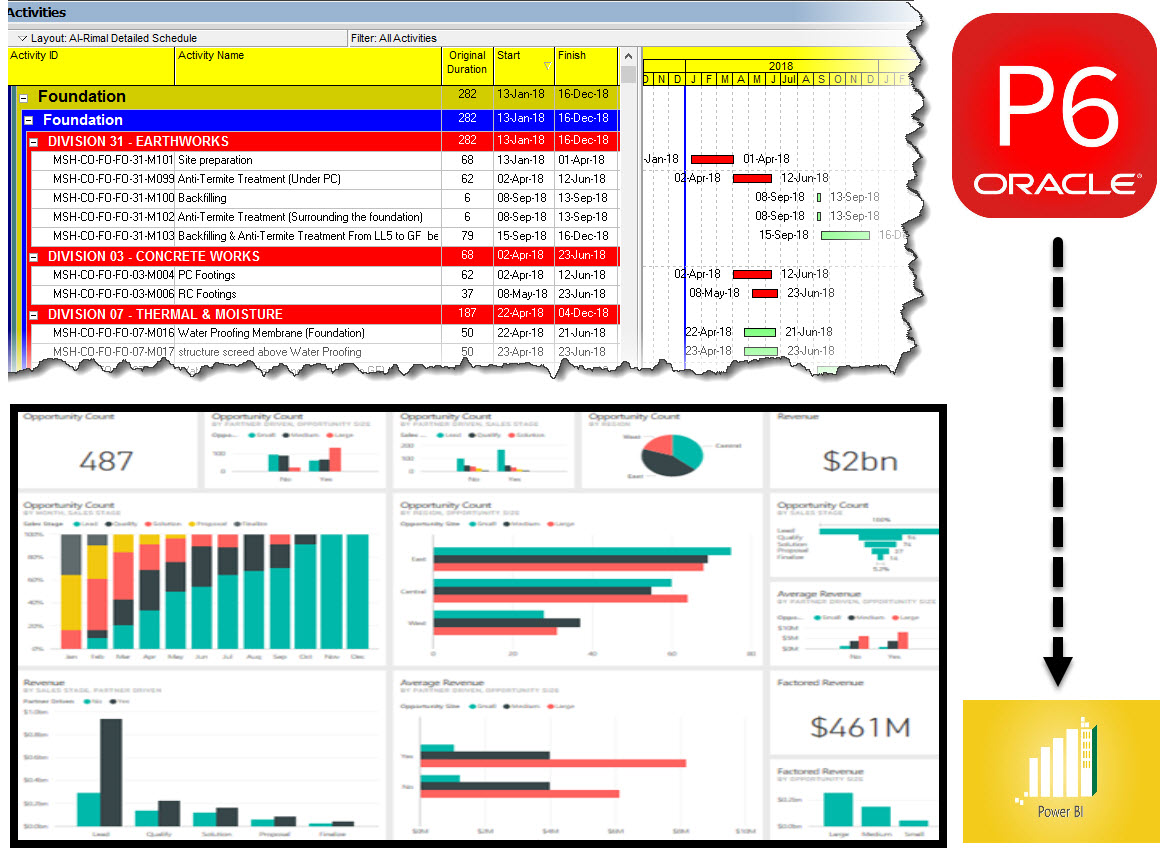
    Primavera P6 is a construction management software application that enables users to schedule and track construction projects. The software is used by project managers and planners to create and monitor project schedules, resources, budgets, and risks. Power BI is a business intelligence tool that helps users to visualize and analyze data. The two tools can be used together to provide insights into construction projects. For example, Power BI can be used to create visualizations of project data that can be used to identify trends and areas for improvement. Primavera P6 can then be used to create detailed schedules and resources plans based on these insights. Together, these tools can help construction professionals to better manage their projects and improve their results.

    What data can be extracted from Primavera P6 and analyzed in Power BI?

    Power BI is a Microsoft business analytics tool that can be used to extract data from various sources in order to create interactive visualizations and reports. One such data source is Primavera P6, a construction project management software. By connecting Power BI to Primavera P6, users can gain insights into their construction projects that would otherwise be unavailable. For example, Power BI can be used to track the progress of individual tasks, identify bottlenecks in the project timeline, and predict when the project will be completed. In addition, Power BI can also be used to monitor resource usage and identify areas where cost savings can be achieved. By harnessing the power of Power BI, construction managers can gain a better understanding of their projects and make more informed decisions.

    How to create reports and dashboards with Primavera P6 data in Power BI

    The first step is to connect to your Primavera P6 database using the Power BI Desktop application. Once you have connected to the database, you will be able to select the data that you want to include in your report or dashboard.

    Once you have selected the data, you can then start to create your visualizations. Power BI provides a wide range of visualization options, so you can tailor your reports and dashboards to meet your specific needs. For example, you could create a bar chart to track project progress, or a pie chart to compare costs across different project phases.

    Once you have created your visualizations, you can then publish your reports and dashboards to the Power BI service, where they can be shared with others in your organization. Publishing to the Power BI service also allows you to take advantage of features such as scheduled refresh, which ensures that your reports and dashboards are always up-to-date with the latest data from Primavera P6.

    Tips and tricks for getting the most out of Primavera P6 and Power BI Integration

    Here are some tips and tricks for getting the most out of Primavera P6 and Power BI:

      • Use Power BI to create custom reports for your Primavera P6 data. This way, you can easily visualize important information and identify trends.

      • Take advantage of the Data Model Explorer in Power BI to better understand the relationships between different data sets.

      • Use the Query Editor in Power BI to transform and cleanse your data before creating reports or dashboards.

      • Use conditional formatting in Power BI to highlight key data points or visually flag issues.

    By following these tips, you can get the most out of Primavera P6 and Power BI. With these tools at your disposal, you’ll be able to manage your projects more effectively and make better decisions for your business.

    So, there you have it- a quick introduction to Primavera P6 and Power BI. I hope this has given you some ideas about the kinds of reports and dashboards you can create with data from your projects in Primavera P6. In future posts, we’ll explore more specific topics related to working with Primavera data in Power BI, so stay tuned! If you have any questions or comments on this topic, please let me know in the comments below.

  • Types of Oracle Primavera Cloud Licenses

    Types of Oracle Primavera Cloud Licenses

    Oracle Primavera Cloud is for managing projects effortlessly on Oracle’s Most Modern Project Management Platform, it’s a most modern and broader project management platform in the market which still combines some very powerful and unique tools.

    Types of Licenses

    There are four licenses designed to meet the needs of your organization. Licenses determine what apps, pages, functionality, and mobile apps a user has access to.

    Schedule License: For power schedulers to prioritize, plan, manage, and evaluate projects across your organization.
    Portfolio License: For portfolio planners to propose and manage the portfolios across your organization.
    Progress License: For users who only need access to their activities and timesheets.
    Tasks License: For schedulers that use task management to manage their projects.

    Licenses are distributed according to the license model:

    • Licenses are distributed according to the license model:
    • If you have the Named Users license model, then you will assign available licenses to users.
    • If you have the Project license model, then all users will automatically receive the Schedule license, the Tasks license,
    • and the Progress license.
    • If you have the Enterprise Schedule license model, then all users will automatically receive the Schedule license, the Tasks license, and the Progress license.
    • If you have the Enterprise Portfolio Planning license model, then all users will automatically receive the Portfolio license.

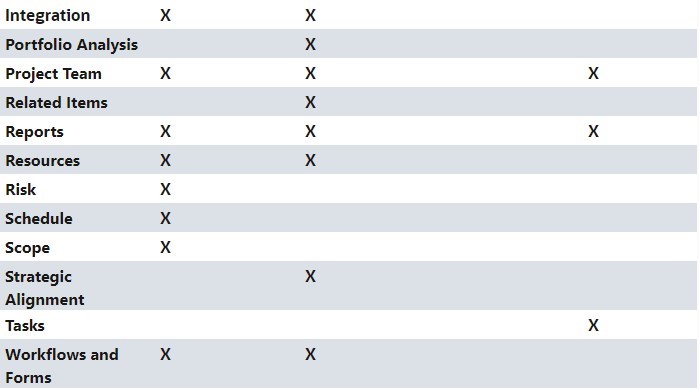
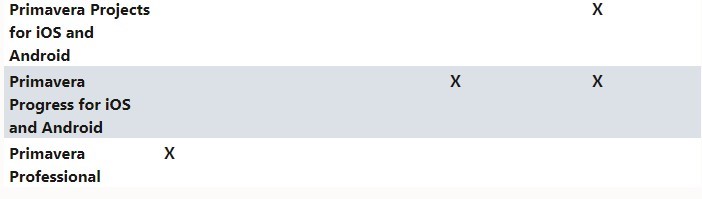
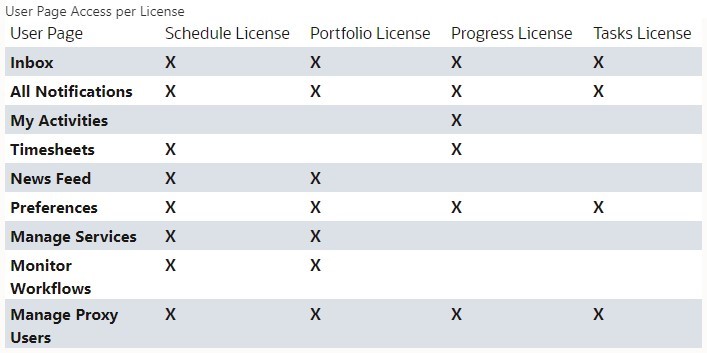
    The tables below highlight which apps, pages, functionality, and mobile apps come with which licenses. Users may still require additional security privileges before they can access the apps, pages, functionality, or mobile apps granted by their license assignment.

    license assignment
    unctionality
    access the apps
     apps, pages, functionality
    Progress license
  • Oracle Primavera Cloud(OPC) vs Primavera P6 EPPM Cloud(SAAS)

    Since the original Primavera P6 was acquired by Oracle in 2008, the product set has grown significantly and now includes multiple applications. This has come about mainly through acquisition, but also includes some newly developed software. Out of all the cloud solutions provided by Oracle, Oracle Primavera Cloud (aka Prime) and Oracle P6 EPPM Cloud(SAAS) stands out the most in the industry. Oracle P6 EPPM and its schedule management has been around the construction industry for the last 30 years and is a proven method to manage your schedules, portfolios, resources, risks and issues. Oracle Prime is fairly a modern cloud solution mostly banking on the lean project management technology with loads if new project controls features loaded in one. The following gives a basic comparison of both.

    Primavera P6 EPPM and P6 Professional 

    P6 EPPM is the flagship product for globally prioritizing, planning, managing and executing projects, programs and portfolios. P6 EPPM comprises two flavours: P6 Web Access and P6 Professional. These applications can be deployed on-premise, on the Oracle cloud or on other non-Oracle hosted platforms.

    P6 Professional is designed to handle large scale, overly complex projects allowing you to organize up to 100,000 activities with unlimited resources. P6 Professional can also be deployed as a stand-alone application (known as PPM)

    Team Member is an additional component which uses mobile interfaces such as phones or tablets to provide a quick, convenient, and easy way to update project status. 

    Key features of P6 include:

      • Flexible user interface

      • Streamlined enterprise reporting

      • Team member interfaces for gathering status updates

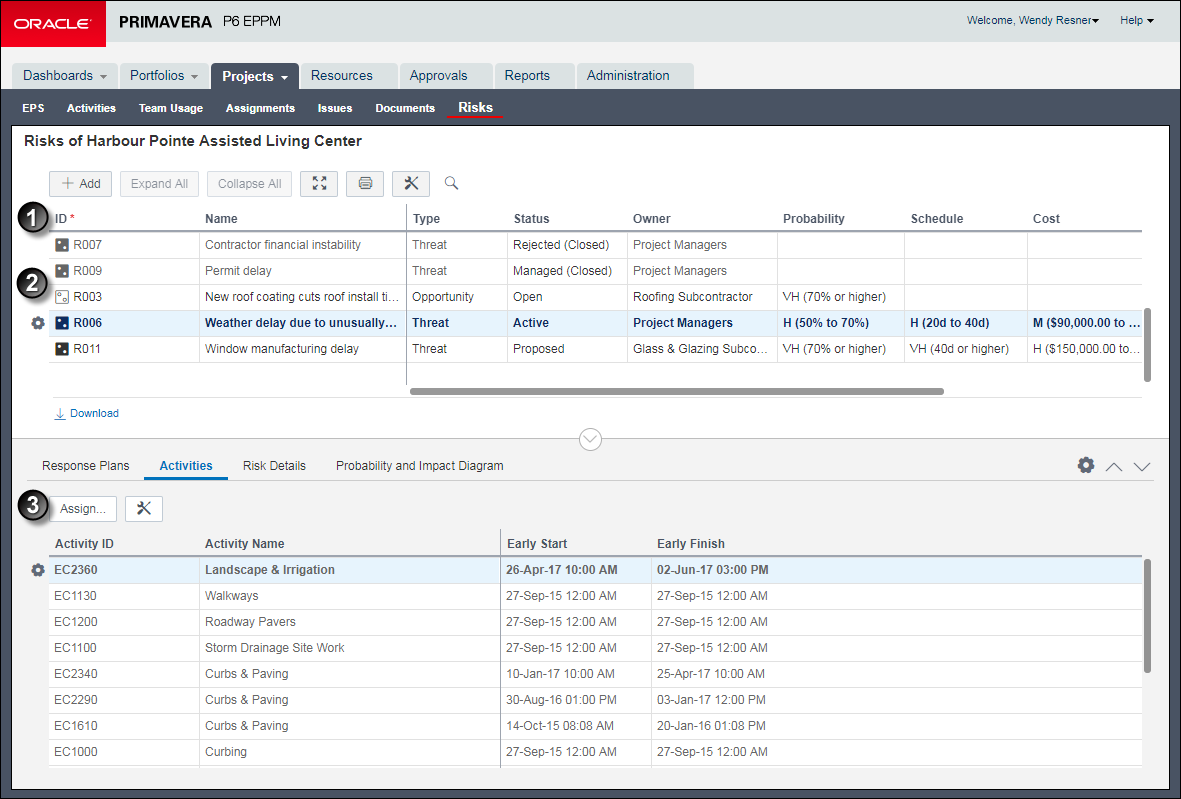
      • Integrated risk management

      • Resource management and optimization views

    Primavera Cloud

    Primavera Cloud (previously known as Prime) is the jack-of-all-trades in the Oracle Primavera arsenal. A comprehensive, cloud-based solution, it comprises tools that allow executives, project members and field users to deliver projects and portfolios effectively, efficiently and with confidence. The huge range of functions spans:

      • Project and portfolio scheduling

      • Resource management

      • Project costing

      • Project and portfolio selection and management

      • Risk management and analysis

      • Contract and change management (including budget management and funding management)

      • Project collaboration (including functionalities like inspections)

      • Primavera Cloud also provides a native, purpose-built mobile application that allows users to access portfolio, project, documents, scope and activity related information in both online and offline mode.

    Key features include:

      • Context-driven rich and lightweight user interface

      • Global search and navigation to major functional areas

      • Built-in workflows with an option to expand via configuration.

      • Web-based interface with no client installation or plug-ins

      • Review and approval of updates to ensure project integrity.

      • Embedded analytics

      • iPad and iPhone applications that support on- or offline project status updates

      • Ability to access, mark up and locally save all project documents via a mobile device

    Comparison:

      • Enterprise Structure:
        • P6 EPPM has EPS for keeping your projects grouped based on Programs and Portfolios, whereas OPC replaces the with newly introduced Workspace.
          • OBS has been replaced with security to access to the workspace in OPC.

          • Code and UDFs options are available similar to P6 EPPM with some additional codes i.e (report code)

          • OPC has default business flows for creating new projects.

      • Resource Master:
          • In OPC  Resource breakdown design is given at different Workspace level and related promotion option. In EPPM, Resource master consists of global data should available at the enterprise level and distributed among Projects.

          • No standard business flow available to transfer the resource master from other ERPs (example – SAP HR), whereas standard business flow available in P6 EPPM. Custom Integration is required to fulfill such requirements using REST APIs or Primavera Gateway.

      • Project Initiation – OPC brings in this feature which is absent in P6 EPPM. The idea is the feature helps to manage the investment plan. This excellent feature is almost the same as OPPM (Oracle Primavera Portfolio management). Hence no need to buy separate products to manage Investment management if needed.

      • Project Planning & Costing:
          • There are five types of activity types in OPC – Activity-Dependent, Resource Dependent, Start Milestone, Finish Milestone, Level of Effort in OPC.

          • WBS Summary Activity type is completely removed in OPC which is present in P6 EPPM and is a very useful method to calculate Project Management Activities.

          • OPC has the inbuilt Schedule sheet, Cost Sheet, CBS structure help to manage the costing. Features are taken from Project Controls. For EPPM, generally a separate and dedicated tool is given for Project Controls.

          • OPC does not have any standard business flows to transfer the data from ERPs(SAP PM, SAP PS, Oracle EBS, etc) and a product like Unifier, Ecosys, etc.

      • Scheduling & Schedule Check:
          • Both are quite similar.

          • Schedule log are available same as P6 EPPM which is missing in OPC.

      • Collaboration:
          • Inbuilt team member application (Timesheet) helps to communicate and collect the progress from users, whereas in P6 EPPM this is separately licensed. However, Compass cloud solutions comes with Team Member integrations and so the feature is similar to OPC.

          • P6 EPPM Comes with P6 Professional Client tool which can use the same features of scheduling and managing project data. It has the same data access as the EPPM. P6 Professional is the most widely used scheduling tool by Project Managers and Planners. No amount of cloud features can be compared to Professional Desktop Client features for fast processing of Project Activities. OPC does not come with P6 Professional use license, Professional client can only be used for Project File Type conversions.

      • Contractor Collaboration:
          • OPC like EPPM supports Primavera XML, Microsoft Project formats.. We can transfer the data from those applications.

          • Excel import is not supported in OPC.

      • Risk Analysis:
          • A full-fledged integrated risk management capability available in OPC. EPPM has a simple risk module for qualitative risk analysis.

          • Activity uncertainty, Monte Carlo Simulation are available in OPC and missing in EPPM. EPPM can be integrated to Primavera Risk Analysis (a separate desktop client tool) for detailed simulation and modelling.  

      • Integration:
          • Primavera Gateway and REST API are the other options to integrate with other applications and ERPs. However, EPPM has standard integration points which the OPC does not have.

          • No standard business flows are available for the other integrations in OPC.

          • P6 EPPM supports multiple integration options and business flows available to integrate with ERPs and other applications, i.e. SAP PM, SAP PS, SAP MM, SAP HR, Oracle EBS, EAM, JD Edwards, IBM Maximo, Navisworks, Smart plant Constructions.

      • Resource Analysis – Almost same as P6.

      • Portfolio – The P6 EPPM Portfolio capabilities are missing in the OPC version, i.e., portfolio analysis, Capacity planning, Performance Status, etc.

      • Leaner schedule, Programs are the other excellent features introduced in the OPC version.

      • Reports – Inbuilt BI Publisher based reports available. However, P6 EPPM Compass cloud comes with BI integration and Primavera Analytics, which actually provides much more features in reporting and analysis than OPC.

      • Implementation – In comparison P6 EPPM is fairly simple to implement than OPC. A lot of structures and business flows needs to be customized in OPC for the client before they can start using the system. Whereas, in P6 EPPM, you can start scheduling and managing projects with simple and minimal configurations.

      • Licensing – Licensing in OPC is fairly complicated yet robust. Users have to buy separate modules for all the features mentioned above.

    Conclusion

    Both P6 EPPM Cloud and Oracle Primavera Cloud are excellent cloud based Project Management solutions. Primavera Cloud provides a few new features of Project Controls along with scheduling and master data controls. If the Project Managers and Planners prefer to work in P6 Professional in offline modes, the P6 EPPM is a clear choice. If the company wants to have new features and would only prefer to work on Web Browsers the OPC is a clear winner.

  • Oracle Primavera EPPM vs Primavera Professional

    Oracle Primavera EPPM vs Primavera Professional

    Oracle Primavera Profession (PPM)

    Primavera P6 Professional Project Management (PPM) is the Primavera Windows-based project planning tool that is popular around the world for managing construction projects. Primavera P6 Professional is a tool to build, schedule and track complex project schedules. Architecturally, it consists of a the Project Management client that installs on a Windows PC and connects to either a server-based or a local database. Microsoft SQL or Oracle databases are supported, as is SQLite.

    Primavera P6 Professional (PPM) is programmed with the Critical Path Method algorithm. At the most basic level it assigns dates to tasks based on sequencing and task duration. The output is a project schedule with dates applied and a Critical Path clearly identified, not to mention the calculation of a project end date. Top that CPM Scheduling engine up with Resource & Cost Management features, Gantt Chart, graphs, spreadsheets, analytic tools and reporting, and Primavera P6 Professional becomes the tool of choice for engineering, heavy construction, oil & gas and related industries.

    Oracle Primavera Enterprise Portfolio Project Management (EPPM)

    Primavera P6 Enterprise Project Portfolio Management is a very advanced and sophisticated enterprise portfolio and project management tool. Primavera P6 EPPM is 100% web-based, so it runs in a browser and connects to a webserver that serves-up a visually-rich interface. P6 EPPM also connects to a main database where all of your project information is stored. The advantages of a web-based project management tool are many. It’s easy to onboard users – just provide a login, no installation on your local PC necessary.

    Primavera P6 EPPM brings a whole new set of features and functionality that sets it apart from mainstay Primavera P6 Professional.  For example, the web side of EPPM is very rich in graphs, charts, pivot tables and dashboards. It’s a new way of seeing P6 project data in a rich graphical sense. Many graphs and charts have drill-down capability so you can dive deep into your data.

    Primavera P6 EPPM has a big focus on Portfolio Management, which allows you to manage groups of projects together in a portfolio, and to manage that data, be it cost, schedule or resource focused.

    The major differences are as follows:

    Architecture:

    P6 PPM follows a two tier architecture, the client (windows based) is connected directly with a database. The database can be in the same PC as the application or be centrally hosted in a server. The data can only be accessed from PCs installed with the client tool.

    P6 EPPM follows a three tier architecture. The database and application servers are installed separately and the data can be accessed using Web browsers or client application. P6 EPPM has the advantage of accessing data from anywhere anytime and also backups and data protection capabilities are much more systematic.

    Dashboards:

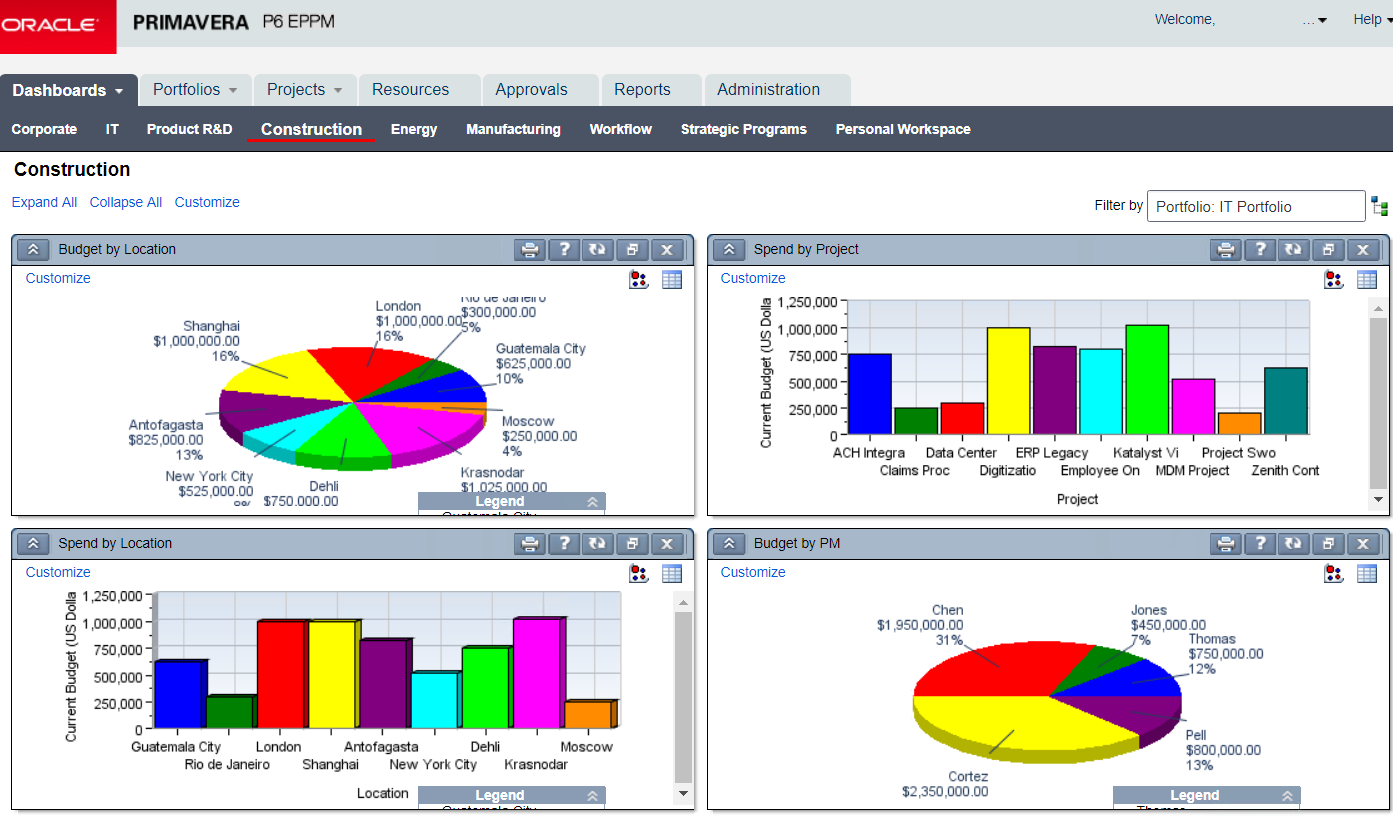
    P6 EPPM comes with its own dashboards and personalized pages where is it is easier for the user to access the relevant data. Also the dashboard gives a much more analytical and strategical advantage over the PPM.

    Portfolio Management:

    P6 EPPM comes with its own portfolio management which the PPM is not capable of. EPPM tool is designed for Schedulers, Planners, Project Managers as well as Senior Management. PPM whereas doesn’t give much benefit to senior management or portfolio managers.

    BI & Analytics:

    P6 EPPM can be integrated out of the box with Oracle BI which gives it access to numerous analytical dashboards and reports.

    Integrations & Scalability:

    P6 EPPM comes with Web services and connectivity with Primavera Gateway. These tools allows the P6 to be integrated with legacy tools, Project control tools as well as major ERP tools. This makes the tool scalable and easily sustainable for a comprehensive automation solution for any industry.

    Progress Reporter & Mobile Applications:

    P6 EPPM comes with Team member and mobile applications in both android and iOS platforms. This makes site users to easily update daily logs and updates in the system and the project managers see the data real time.

    Summary:

    While both Primavera P6 Professional and Primavera P6 EPPM are capable of supporting an enterprise-wide deployment for the purposes of collaboration and project portfolio management, P6 Professional tends to be favored by planners because of its stability, responsiveness and ability to support standalone use.

    On the other hand, P6 EPPM is generally favored for deployments where a wide range of project stakeholders are interested in accessing project portfolio data due to its unique Dashboard and Portfolio data tabs that present summary project data and interactive capabilities for a matrix organization. Also, P6 EPPM gives a lot more features with just a fraction of extra cost. Because this system is Web-based, it is also favored by IT departments for its easier distribution to geographically remote locations including international access. If the user has internet access, they can interact with Primavera P6 EPPM.

    FeaturesP6 EPPMP6 PPM
    Project Planning
    Project Scheduling
    Resource Management
    Cost Management
    Earned Value Management
    Portfolio Management 
    Dashboards 
    Collaboration✓ 
    Supports Publication Services 
    Supports Web Services 
    Supports Mobile Application 
    Supports Primavera Gateway 
    Supports Integration API 
    Supports BI Reporting 
    Supports Analytics Reporting 
    Supports Integration with other Applications ✓ 
    Supports Timesheet/Progress Reporter 
  • What’s New in Primavera P6 Version 20?

    What’s New in Primavera P6 Version 20?

    New Features in Primavera P6 EPPM Version 20.12 explained in detail

    Oracle announced its Primavera P6 EPPM Version 20.12 just before Christmas 2020! So what’s new? Let’s jump straight in…

    So the major spotlight features introduced in Version 20.12 of Primavera P6 EPPM were as follows:

    A Quicker Way to Customize Grids:
    The column menu is an intuitive and simple way to customize grids in the EPS, Activities, and Assignments pages. The drop down menu available in the heading of each column allows you to customize grouping and sorting, remove columns from the view, and rename columns. You can also pin columns to the start of the list, snap each column’s width to fit its contents, and find and replace text within a column.

    Categorize and Organize Assignments Using Codes:
    With potentially many thousands of active resource and role assignments across hundreds of projects, assignment codes provide another method for grouping, sorting, and filtering the assignments you need to access quickly.

    Financial Period Calendars Allow You to Use Different Financial Periods for Different Projects:
    You can create multiple financial period calendars with different periods. The different financial period calendars can have different durations as well as different start and end dates to each period, so you can have one calendar with financial periods of four weeks duration, another with weekly financial periods, and yet another with financial period calendars aligning with calendar months.

    You can create new financial period calendars from scratch or duplicate an existing calendar as the basis for a new financial period calendar. Chose one financial period calendar to be the default for new projects and projects imported without a financial period calendar specified in the import file.

    Easily see which projects are using any financial period calendar and assign financial period calendars to your views to ensure data is spread according to the correct calendar for the project.

    Choose How Start Time is Recorded When a Team Member Starts a Not Started Activity:
    You can control how start time is recorded when a team member starts an activity or assignment in P6 Team Member Web, P6 for Android, or P6 for iOS for the first time on any activity or assignment with a scheduled start earlier than the current date and time.

    An application-wide setting allows you to specify whether the start time should be recorded as the start of the calendar work period, the start of the day (that is midnight on the scheduled start date), or the time at which the team member clicked the Start button.

    Continue to Work in P6 Professional When no Network Connection is Available:
    Offline mode extends the Primavera Cache Service to allow users to continue working in P6 Professional while their internet connection is unavailable. When internet connectivity is restored, users can reconnect to the cloud and P6 Professional will synchronize the data in the local cache database with the Cloud Connect database. Users can also choose to work offline and reconnect to the cloud as and when it is convenient.

    Exception Site List option added to the General Page of the Application Settings pane:
    With this option, you can specify a list of websites that users can click on directly and launch from user-defined fields (UDFs), projects websites, Notebook topics, and Team Member Web. For websites not included in
    the list, users can copy and paste them into their browser and launch them manually.

    Categorize and Organize Activities and Assignments Using Role Codes:
    With potentially hundreds of roles being used across an enterprise of projects, role codes provide another method for filtering the roles you need to access quickly, or for grouping, sorting, and filtering roles and role assignments.

    Role Prices Can Vary Over Time:
    The Prices and Limits detail windows of the role administration page
    have been combined as the Units and Prices detail window. Each effective date can change not only the work limit (also known as Max Units/Time) but each of the rates for the role (also known as Price/Unit).

    Withdraw a Timesheet After Submission:
    In Team Member Web you can withdraw a timesheet you have submitted if it has not yet been approved or rejected. Withdrawing a timesheet allows you to make changes or updates to the hours you have recorded.

    User Defined Field Detail Windows:
    You can view, assign, edit, and delete the UDF assignments for activities, WBS nodes, projects, EPS nodes, resources, resources assignments, issues, and risks in a detail window.

  • All New 16.1 of EPPM Gives P6 Web Look

    All New 16.1 of EPPM Gives P6 Web Look

    Oracle released the latest version of Primavera P6 Enterprise Project Portfolio Management (EPPM), release 16.1, and has given P6 Web a facelift. As promised, Oracle is gradually removing the Java applets needed to load pages in P6 Web. This means users will not need to install or update Java plugins or wait for pages to load (no more headaches… well, at least less of them!). The new HTML-based pages are faster, lighter, and are improving as Oracle transitions Java out of P6 Web all together. A slow progress, but anything worth waiting for usually takes time! Of course, P6 Web, P6 Professional, and P6 Team Member received a few needed updates as well.

    UPDATES IN P6 WEB

    The EPS, Activities, and Resource Assignments pages are available in HTML.

    As mentioned before, Oracle is gradually moving P6 Web to HTML. This is great for users wanting to use Chrome or other Internet browsers for P6 Web. In this release, users have access to both the HTML-based and Java-based versions of the EPS, Activities, and Resource Assignments pages. Oracle still offers both versions because the new HTML-based pages don’t have the same as the Java-based pages functionality…yet. Users can switch between views and use the Java-based page to perform advanced functions. Here is a breakdown:

    • The Java-based version of the EPS, Activities, and Resource Assignments pages are labelled the “Classic View”.
    • The HTML-based version of the EPS and Activities pages are labelled the “Standard View”.
    • The HTML-based version of the Resource Assignments page is labelled the “Basic View”.

    Global and User Templates Available in Global Search and Replace

    Now, you can distinguish between Global and User templates when you are selecting a template in the Global Search and Replace box. As per usual, Global templates are available to all users and User templates are available to individual users.

    Improved Options for Copying Projects

    When you are copying projects, you can select to copy Risks, WPs, Docs, and, under Relationships, Only between copied Activities.

    The Only between copied Activities lets you select whether you want to copy only the relationships between activities being copied, or if you don’t select the option, to copy all relationships including relationships to external activities.

    View Daily Usage in the Team Usage Page

    Open the Team Usage page (under the Projects tab) to view the usage of individual team resources. This drill-down functionality will help you identify where you are over-allocating team members right down to the day!