

Primavera P6 is the scheduling software that many owners, contractors and consultants rely on to plan and control large capital projects. If you have been asked to read a P6 programme, build one, or decide whether your organisation needs the software, this guide explains what Primavera P6 is, how it is structured, what it does well, who uses it and how it is licensed. It also covers the limitations that experienced planners raise most often, so you can judge it with a clear view.
What is Primavera P6?
Primavera P6 is Oracle’s enterprise project scheduling software, used to plan, schedule, resource and control large, complex projects and portfolios. It calculates the critical path of a programme, tracks progress against a baseline and shows how delays and resource constraints affect the finish date.
The software began with Primavera Systems, a company with roughly 25 years of project management history when Oracle announced it would acquire the business in October 2008. Since then, P6 has been developed as part of Oracle’s construction and engineering product family. The “P6” name comes from the version numbering of Primavera’s enterprise product, which succeeded P3, the desktop tool many senior planners first learned on.
The reason the software matters is scale. McKinsey research found that 98 percent of megaprojects suffer cost overruns of more than 30 percent, and 77 percent finish at least 40 percent late.[1] Primavera P6 does not remove that risk on its own, but it gives project teams a structured, auditable model of the work, so slippage is visible earlier and decisions are based on logic rather than opinion.
What are the editions of Primavera P6?
Primavera P6 comes in two main editions. Both use the same scheduling engine, so a programme built in one behaves the same way in the other. The difference is how many people use it and how the data is shared.
P6 Professional
P6 Professional is a Windows desktop application, often called P6 PPM. It suits individual planners and small teams who build and update programmes on their own machines, either as standalone files or connected to a shared database. Many contractors use it to prepare tender and contract programmes.
P6 EPPM
P6 Enterprise Project Portfolio Management (EPPM) is web-based and runs on a central database. It is built for organisations running many projects at once, where several planners, project managers and executives need controlled access to the same data. Oracle Primavera P6 EPPM adds portfolio views, user security, team member progress updates and enterprise reporting on top of the core scheduling functions.
Oracle also offers Primavera Cloud, a separate subscription platform that is not the same product as P6. The two are often confused, so it is worth reading a direct comparison of Primavera P6 and Oracle Primavera Cloud before choosing between them.
What is the structure of a Primavera P6 project?
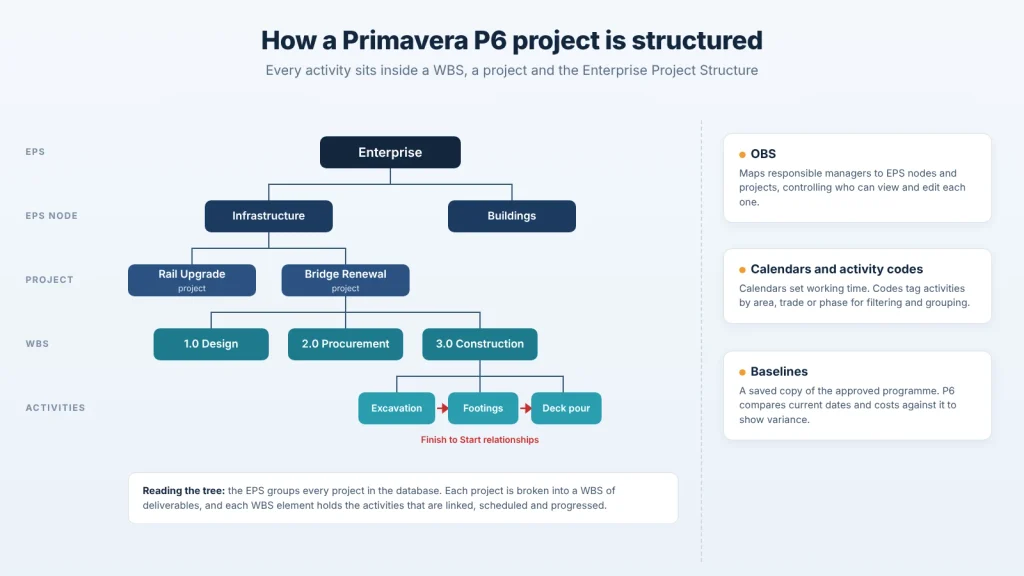
Every Primavera P6 project sits inside a set of nested structures. Getting these right at the start is what makes a programme easy to update, filter and report on later. Most problems planners inherit on live projects trace back to a weak setup here.
Enterprise Project Structure and Organisational Breakdown Structure
The Enterprise Project Structure (EPS) is the top-level hierarchy that groups every project in the database, for example by region, client or business unit. The Organisational Breakdown Structure (OBS) maps the people responsible for each part of that hierarchy. Together, they control who can see and edit which projects.
Work Breakdown Structure
The Work Breakdown Structure (WBS) divides a single project into deliverable-based packages, such as design, procurement, civil works and commissioning. A clear WBS lets you roll up dates, costs and progress at any level, which is how summary reports for clients and executives are produced.
Activities, relationships and calendars
Activities are the individual tasks with durations. They are linked by four relationship types:
- Finish to Start (FS): the next activity starts when the previous one finishes. This is the most common link.
- Start to Start (SS): two activities start together, or one after a lag.
- Finish to Finish (FF): two activities finish together, or one after a lag.
- Start to Finish (SF): rarely used; one activity cannot finish until another starts.
Calendars define working days, shifts and holidays. Assigning the right calendar to each activity is essential, because P6 calculates dates from working time, not elapsed time.
Activity codes and baselines
Activity codes are tags you attach to activities, such as area, trade, subcontractor or phase. They let you group, filter and colour the programme without changing its logic. A baseline is a saved copy of the approved programme. Once set, P6 compares the current schedule against it to show variance in dates, durations and costs.
What are the key features of Primavera P6?
Primavera P6 is used for critical path scheduling, resource planning, cost and earned value tracking, progress reporting against a baseline and exchanging programme data between parties. Each feature below shows what it does and how teams use it on real projects.
Critical path scheduling and float
The critical path is the longest chain of linked activities through a programme. It sets the earliest possible finish date, so any delay to a critical activity delays the whole project. Float is the time an activity can slip without affecting the finish date or the next activity.
P6 calculates both automatically each time the programme is scheduled, using the logic, durations and calendars you have entered.
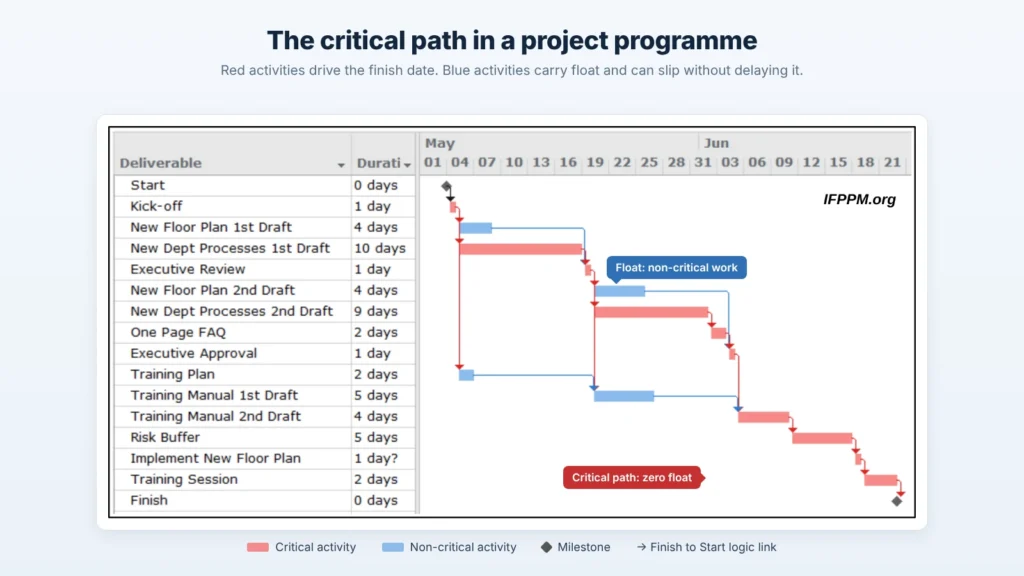
Used for: identifying which activities need the closest management attention, and testing how a late delivery or design change moves the completion date.
Resource planning and levelling
P6 lets you assign labour, plant and materials to activities, then view demand over time as resource histograms and curves. Resource levelling delays non-critical work where demand exceeds availability.
Used for: checking whether a crew, crane or specialist subcontractor is overcommitted, and sharing a limited labour pool across several projects.
Cost tracking and earned value
Costs can be loaded against activities and resources, then grouped by cost account. As progress is recorded, P6 calculates earned value measures such as planned value, earned value, actual cost and the cost and schedule performance indices.
Used for: showing whether a project is ahead or behind in both time and money, and forecasting the final cost from current performance.
Baselines and progress updating
Teams record actual start and finish dates, remaining durations and percent complete at each update period. P6 then reschedules the remaining work and compares it with one or more saved baselines.
This is where software meets discipline. In a BuiltWorlds panel on construction scheduling, scheduling leaders from JE Dunn Construction and Layton Construction drew a clear line between building a schedule and managing one through the life of a project. P6 supports the second part, but only when updates are made consistently.
Used for: monthly progress reporting, variance analysis and supporting extension of time or delay claims with a documented record.
Reporting and layouts
Layouts control which columns, bars and groupings appear on screen, so the same programme can be shown as a detailed planner’s view or a one-page summary. P6 also produces tabular reports and exports to Excel.
Used for: client progress reports, look-ahead programmes for site teams and executive summaries rolled up by WBS or activity code.
Programme exchange with XER files
XER is Primavera P6’s native export format. It packages a project’s activities, logic, calendars, resources and codes into one file that another P6 user can import.
Used for: submitting contract programmes to clients, sharing updates between contractors and consultants, and giving independent reviewers the full scheduling data rather than a PDF.
What industries use Primavera P6?
Primavera P6 is used wherever projects are large, long and contractually demanding. In these sectors, clients often specify P6 in the contract, so contractors and consultants adopt it to meet submission requirements.
- Construction: commercial, residential and social infrastructure projects such as hospitals, schools and towers.
- Infrastructure and transport: roads, rail, bridges, tunnels, ports and airports.
- Energy and utilities: power generation, transmission, renewables, water and wastewater.
- Mining and resources: mine development, processing plants and shutdowns.
- Oil and gas: upstream facilities, pipelines and plant turnarounds.
- Defence and government: capital works programmes with strict reporting obligations.
What roles work in Primavera P6?
The people who build and maintain P6 programmes are usually planners and schedulers. Around them, several other roles read and rely on the outputs:
- Project controls managers set scheduling standards and review programme quality.
- Cost engineers link costs to the programme and report earned value.
- Risk managers use the programme as the basis for schedule risk analysis.
- Project and construction managers use look-ahead programmes to direct site work.
- Owner and client teams review contractor programmes and assess delay claims.
What is the licensing model of Primavera P6?
Primavera P6 is licensed per named user, with a separate licence type for each edition. Understanding the terms below helps you size a licence correctly and avoid compliance surprises later.
- Named user: a licence is tied to an individual person, not to a device or a concurrent session. Every account set up in the system counts, including inactive, test and service accounts.
- Edition-specific licences: P6 Professional and P6 EPPM are licensed separately. An EPPM licence covers web access and portfolio functions that a Professional licence does not.
- Perpetual licence: a one-off purchase that gives the right to use a version of the software indefinitely.
- Annual support and maintenance: an ongoing yearly fee on top of a perpetual licence. It provides access to updates, patches and Oracle support. Letting it lapse and reinstating it later can attract penalties.
- Indirect access: users who view or change P6 data through another system, such as a reporting portal or integration, may still need to be licensed.
Licence needs vary with team size, the number of projects and how P6 connects to other systems, so it is worth confirming the right mix with a specialist before purchasing.
What are the limitations of Primavera P6?
Users rate Primavera P6 highly for capability but lower for ease of use. On G2 it holds an average of 4.4 out of 5 across 391 reviews,² while on Capterra its ease-of-use score sits at 3.7 out of 5, below its overall rating.³ Across user reviews and long-running planner forums, the same limitations come up repeatedly:
- Steep learning curve. Many users say it takes months of regular use, or formal training, before they are confident. The terminology and the number of settings can overwhelm new users.
- Dated interface. Menus and tools are often described as hard to find, and the layout feels older than modern project apps.
- Hard for non-planners to read. Engineers, site supervisors and procurement staff often struggle to interpret a detailed P6 programme without a summary view or guidance.
- Reporting takes extra work. Planners frequently export to Excel to produce charts and client-ready reports.
- P6 Professional is Windows-only. Mac users need a virtual machine or the web-based EPPM edition.
- More than small projects need. For short, simple programmes, the setup effort and licence cost can outweigh the benefits.
The general view among experienced planners is balanced. Most accept that P6 is difficult to learn, but value its scheduling logic and its handling of multiple projects that share one resource pool. Many also point out that clients often require it, so learning it is a practical career step. For teams weighing simpler tools, a comparison of Microsoft Project and Primavera P6 is a sensible next read.
What do people ask about Primavera P6?
What is an XER file in Primavera P6?
An XER file is Primavera P6’s native export format. It contains a project’s activities, relationships, calendars, resources and codes, so another P6 user can import the complete programme. Clients commonly request XER files as part of contract programme submissions.
Is Primavera P6 hard to learn?
Primavera P6 has a steeper learning curve than general project tools. Most new users can navigate a programme after introductory training, but building and maintaining a sound programme takes regular practice and a good grasp of scheduling principles.
Can Primavera P6 run on a Mac?
P6 Professional is a Windows application, so it does not run natively on a Mac. Mac users typically run it through a Windows virtual machine or use P6 EPPM through a web browser.
Can Primavera P6 import Microsoft Project files?
Yes. Primavera P6 can import Microsoft Project files, including XML exports. Logic, calendars and constraints should be checked after import, because the two tools calculate some dates differently.
Is Primavera P6 cloud-based?
P6 EPPM is web-based and can be hosted on premises or by Oracle. P6 Professional is a desktop application. Oracle Primavera Cloud is a separate subscription product rather than a cloud version of P6.
Get the right setup from the start
Primavera P6 delivers the most value when the licence, structure and reporting are set up around how your teams actually plan and report. If you are considering P6 or want to get more from an existing installation, talk to a Compass Consult P6 specialist about licensing and implementation.