

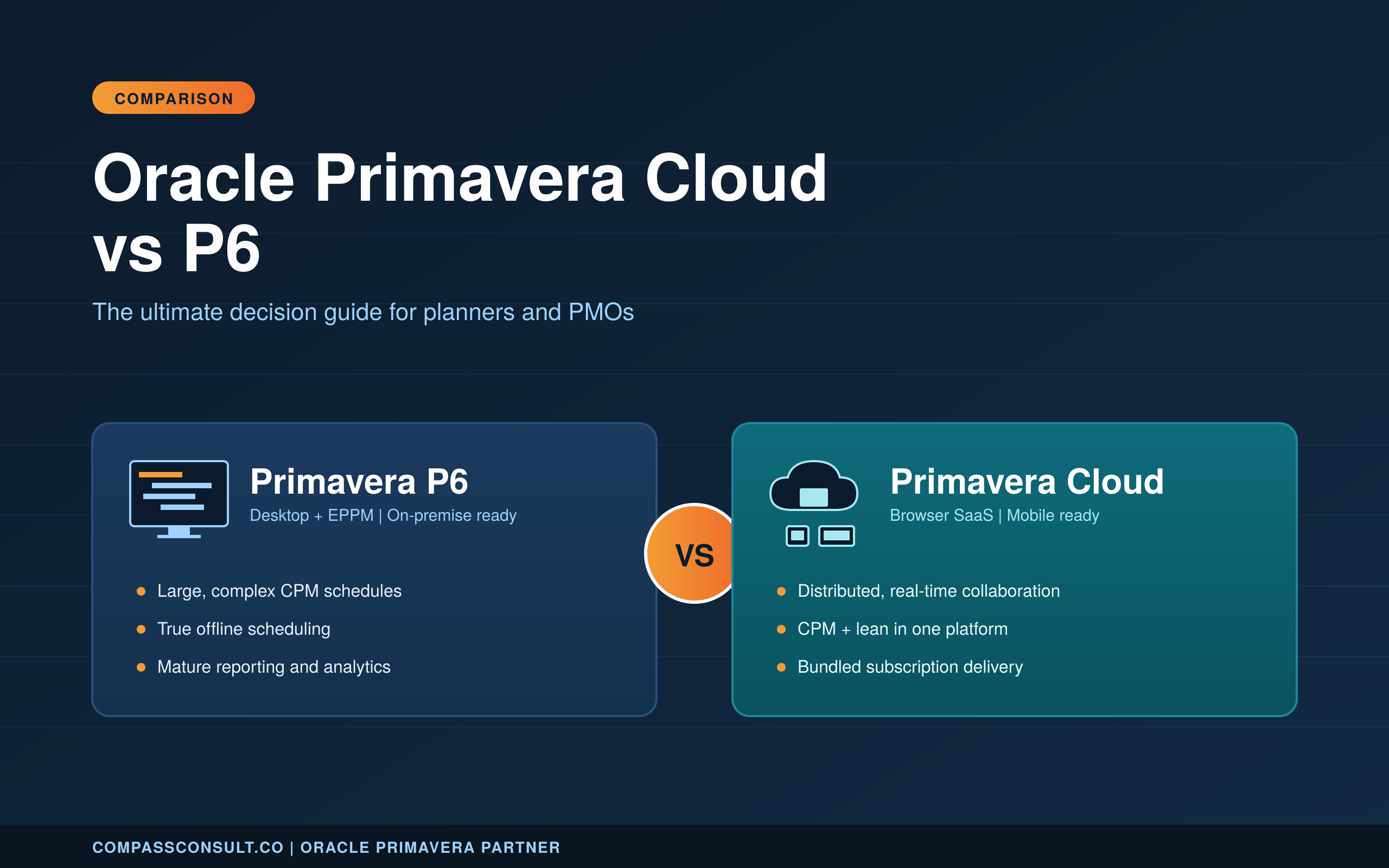
Oracle Primavera Cloud vs P6 is the question every project controls team is working through right now. Oracle has not retired Primavera P6, yet it is investing heavily in Oracle Primavera Cloud (OPC), and planners, project controls leads and PMO heads are being asked to pick a direction. This guide compares the P6 family and OPC side by side, so you can make the call with evidence rather than vendor marketing.
Oracle Primavera Cloud vs P6: Understanding the two platforms
Before comparing features, it helps to share a common definition of each product. Primavera P6 is a family of software, not a single application. Underneath the P6 brand sit two deployments that share the same database schema and the same CPM scheduling engine.
Oracle Primavera Cloud, on the other hand, is a separate SaaS suite Oracle built from the ground up, and it is positioned as the forward-looking product. Throughout this guide, when we say P6 we mean the family, and when we compare against OPC we are comparing the whole P6 family against Oracle’s cloud suite.
What is Primavera P6?
Primavera P6 is Oracle’s enterprise scheduling platform and the long-standing standard for critical path method planning on large, complex projects. If your organisation delivers EPC work, major infrastructure, oil and gas, defence, utilities or any programme where a schedule may run into the tens of thousands of activities, P6 is almost certainly in the mix. It is built for deterministic planning, forensic schedule analysis, delay claims work and offline use on sites without reliable connectivity.
P6 ships in two main deployments that share the same database. Oracle Primavera P6 Professional, sometimes called PPM (Project Portfolio Management), is the Windows desktop client favoured by schedulers. It gives full keyboard-driven access to activity logic, codes, resources and layouts, and it is the tool most delay-claims experts and heavy-schedule users insist on. Primavera P6 EPPM (Enterprise Project Portfolio Management) is the web-based deployment that layers team-member access, dashboards, workflows and portfolio features on top of the same scheduling core. Many organisations licence both: Professional for the planners who build the schedule, EPPM for the wider project and portfolio team who consume it.
What is Oracle Primavera Cloud (OPC)?
Oracle Primavera Cloud is Oracle’s SaaS project controls suite. It bundles scheduling, risk, lean task management, cost management, portfolio selection and collaboration into one subscription, delivered through the browser. OPC is designed around distributed teams and a modern user experience, with a mobile app that supports offline sync for field updates.
Where OPC makes sense: distributed project teams that need browser-based access from anywhere, organisations that want CPM scheduling and lean or pull planning living in the same tool, PMOs that prefer predictable subscription delivery over a large upfront licence outlay, and teams starting fresh without a decade of P6 customisations to migrate. OPC is strong on real-time collaboration, workspace-level governance and embedded dashboards. The one caveat worth stating plainly: OPC is not a drop-in replacement for P6 Professional on very large, offline-first schedules, and seasoned planners who live inside the desktop client often find the browser-first workflow slower for complex activity logic work. Learn more about our Oracle Primavera Cloud implementation services.
Oracle Primavera Cloud vs P6: Feature comparison at a glance
Use this table as a decision shortcut. Rows marked “Advanced” or “Native” mean the capability ships inside the product; “Add-on” means you need a separate Oracle module or third-party tool to get it.
| Category | Capability | Oracle Primavera Cloud | Oracle Primavera P6 EPPM |
|---|---|---|---|
| Scheduling | Critical Path Method (CPM) | Yes | Yes |
| Scheduling | Lean / pull-planning (Last Planner style) | Native | No |
| Scheduling | Schedule comparison and baselines | Advanced, built-in | Basic, Claim Digger add-on |
| Scheduling | What-if scenarios | Native | Via copied projects |
| Scheduling | Mega-project scale (100k+ activities, deep WBS) | Limited | Yes — proven on EPC and infra |
| Risk | Monte Carlo risk analysis | Native | Add-on (Primavera Risk Analysis) |
| Risk | Qualitative risk register | Native | Native |
| Cost | Cost-loaded schedules | Yes | Yes |
| Cost | Cost Sheet (Budgets, Actuals, Forecast) | Native | No |
| Cost | Capital planning and portfolio funding | Native | Portfolio add-on |
| Resources | Resource and role assignments | Yes | Yes |
| Resources | Levelling of both resources and roles | Yes | Resources only |
| Reporting | User-created advanced reports | Native | BI Publisher / Analytics add-on |
| Reporting | Dashboards and KPIs | Native, drag-and-drop | Via dashboards module |
| Reporting | Export to UN/CEFACT Format 6, IPmdar, CPP | No | Yes |
| Reporting | Advanced Gantt chart printing (claims pack) | Limited | Yes |
| Collaboration | Forms and workflows | Native | No |
| Collaboration | Real-time multi-user editing | Yes | Check-in / check-out |
| Progress | Mobile status updates | Yes (OPC mobile) | Yes (Team Member) |
| Deployment | Delivery model | SaaS (Oracle-hosted) | On-prem, private cloud, or hosted |
| Deployment | Update cadence | Monthly, automatic | Quarterly, scheduled |
| Deployment | Offline work | No | Yes (P6 Professional) |
| Integration | REST API | Native | Yes (P6 EPPM Web Services) |
| Fit | Best-fit project profile | Small to mid, distributed teams, lean/cost-heavy | Mega-projects, claims-heavy, offline sites |
In one line: Oracle Primavera Cloud is the better choice when the win condition is collaboration, cost control, and risk modelling without add-ons. Oracle Primavera P6 EPPM is the better choice when the win condition is schedule depth, claim-grade reporting, and proven scale on mega-projects.
What Oracle Primavera Cloud does that P6 does not
Lean Schedule Management (pull planning, built-in)
OPC is the only Primavera product with native Last-Planner-style pull planning. Superintendents commit to short-interval work on sticky-note boards that write straight back to the master schedule — no exports, no separate Trello or Touchplan licence. If your projects run weekly work plans or have a lean mandate (common on US healthcare and AU rail jobs), this capability is the main reason to move off P6.
Monte Carlo risk analysis without a second licence
In P6 you buy Primavera Risk Analysis (the old Pertmaster) as a separate product, run it outside the schedule, and import results back. OPC runs a quantitative risk simulation against the live schedule — duration uncertainty, risk register impacts, probabilistic finish dates — inside the same browser window. For PMOs that need P50 / P80 dates on every schedule update, this removes a whole tool from the stack.
Cost Sheet — budgets, actuals and forecast on one grid
P6 is a scheduling tool with resource and cost loading; it is not a cost-management tool. OPC’s Cost Sheet is a proper budget / actual / ETC / EAC grid tied to WBS, so owners and contractors can run cost reporting against the schedule without bouncing to Excel or a separate ERP module. This is the feature that wins owner-side evaluations.
Forms and Workflows
OPC ships configurable forms (RFIs, change orders, approvals) with routed workflows. P6 has none of this — any form of change control sits in Unifier, in a separate PM tool, or in email. On projects where the schedule and the change log have to agree, keeping both in one platform is a real reduction in reconciliation work.
User-created advanced reports and dashboards
P6’s reporting is split: list reports inside P6, pixel-perfect reports in BI Publisher, dashboards in a separate Analytics module. OPC lets a planner build a report or dashboard inside the app, share it to a workspace, and schedule it to a distribution list — no BI developer needed.
Also worth knowing
OPC also adds capital planning (project selection and portfolio funding across a programme), schedule comparison that highlights changes between two updates visually, and levelling of roles as well as resources — all of which require workarounds in P6.
What Primavera P6 still does better than Oracle Primavera Cloud
Depth on mega-projects
P6 is built on a mature relational schema optimised for projects with 100,000+ activities, multi-year schedules, and deep WBS. Oracle Primavera Cloud is a SaaS application designed for modern interfaces and collaboration, and its performance envelope on very large CPM schedules is narrower. If you plan EPC, metro, nuclear, LNG or defence programmes, P6 remains the safer choice today.
Claim-grade printing and submissions
P6 has advanced Gantt chart printing with fine control over bars, labels, annotations and page breaks. For construction claims, extension-of-time submissions, and government progress reports in Australia, the US and the UK, that control is non-negotiable. OPC’s output is cleaner but less configurable.
Industry exchange formats (UN/CEFACT, IPmdar, CPP)
P6 exports to UN/CEFACT Format 6 (used in US federal submissions), IPmdar (IPMDAR / DCMA) and CPP (Contract Performance Package) formats out of the box. OPC does not. If your contracts require any of these, P6 is the only Primavera product that qualifies.
Offline work and remote sites
P6 Professional runs as a desktop client against a local database — schedules keep working on a plane, on a rig, in a tunnel, on a site office with intermittent internet. OPC is cloud-only; no connection, no schedule.
A thirty-year ecosystem
Claim Digger, Acumen Fuse, Schedule Reader, Deltek Acumen, Steelray, ScheduleCleanser, Primavera Analytics, BI Publisher, Risk Analysis, Unifier — the P6 third-party ecosystem is deep. OPC’s is still forming. If your workflow depends on an existing add-on, confirm its OPC equivalent before you move.
Oracle Primavera Cloud vs P6: Key differences you need to know
The feature table earlier in this guide gives you the shape. This section explains what actually changes under the hood when you move between Oracle Primavera Cloud vs P6, and why those changes matter day to day.
Project structure: EPS vs Workspaces
In P6 you organise projects with the Enterprise Project Structure (EPS) — a tree with as many root nodes as you want, usually grouped by division, geography, phase or project size. Security, codes and templates attach to EPS nodes.
In Oracle Primavera Cloud the equivalent is the workspace hierarchy, with one important constraint: there is a single top-level Root workspace (typically renamed to your company name). Under the Root you usually see two workspaces — Production and Non Production — and every project-holding workspace is a child or grandchild of one of those. Security, dictionaries, calendars, codes, resources and roles all cascade down this tree.
What changes in practice
- You trade flexibility (multiple EPS roots) for consistency (one Root). Governance is easier, ad-hoc structures are harder.
- Reference data is no longer global. In P6 a currency or a baseline type lives at the enterprise and applies everywhere. In OPC the same objects live in dictionaries at a workspace level and are inherited down. Set them too low and projects cannot see them; set them too high and every project inherits things it does not need.
- Most companies have an Application Administrator design the Root / Production / Non-Production layer, and let each business unit add workspaces underneath for its own projects.
Planning tip for the migration. Before you move a single project, draw the target workspace tree and map each P6 EPS node to a workspace path. Workspaces are easy to add and painful to re-parent later.
Scheduling engine: what changes and what doesn’t
The underlying CPM scheduling logic is substantially similar across both platforms. Activities, relationships, constraints, calendars and float calculations behave the way a P6 planner expects. What differs is the surface.
- P6 Professional gives you keyboard-driven activity grids, layouts and schedule logs that seasoned planners rely on.
- Oracle Primavera Cloud (OPC) uses a browser-first interface with views instead of layouts, and schedule logs are not surfaced in the same form. Some scheduling diagnostics P6 users take for granted require more clicks in OPC.
Resource and role management
- P6’s global resource pool is powerful for enterprise resource levelling across the whole portfolio, and it is what large EPC contractors tend to build their operations around.
- OPC localises resources to workspaces by default, with shared resource options available. For a single project or a small portfolio this is cleaner.
Where resources live has changed. In P6, resources and roles are enterprise-wide — you create them once in the central dictionary and assign them to any project. In OPC you create them at a workspace (or a specific project) and share them down the hierarchy. The upside is better governance; the downside is more thought up-front about which workspace owns a given discipline or crew.
Role levelling is new in OPC. P6’s resource levelling smooths out over-allocation on named resources. OPC can level both resources and roles, which matters at bid stage or on portfolios where you plan with roles before you know the names. If your planners run resource-loaded tenders, this is a real workflow improvement.
Risk analysis: Monte Carlo and Primavera Risk Analysis
Short answer. OPC has quantitative Monte Carlo risk analysis built in. P6 EPPM does not — you add it by licensing Primavera Risk Analysis (PRA), the tool formerly known as Pertmaster.
In P6, the workflow is: schedule in P6, export the XER, open it in PRA, build a risk register, assign duration uncertainty and risk impacts, run the simulation, read the P50 / P80 dates and tornado charts outside the schedule. Results come back as a report, not a live view. PRA is a mature, respected tool — but it is a second product with its own licence, its own training, and its own version compatibility to manage.
In OPC, risk lives in the same browser window as the schedule. You maintain a register, mark activities with pre-mitigated and post-mitigated impacts, run a Monte Carlo against the live CPM, and see probabilistic finish dates and risk contributors against the current baseline. A planner can refresh the analysis on every weekly update without opening a second tool.
What this means for you
- If your organisation already owns PRA and uses it in a formal gate process, the P6 + PRA stack is proven — do not switch just for the integration benefit.
- If you have been wanting Monte Carlo on your schedules but could not justify the PRA licence, OPC is a far cheaper route in.
- OPC’s risk module is capable but less advanced than PRA for correlation modelling and portfolio roll-up. For bid-stage mega-project risk, planners still often reach for PRA.
Reporting: Primavera Analytics vs OPC dashboards
P6 splits reporting across three products. P6 EPPM handles list-style reports inside the browser. BI Publisher handles pixel-perfect PDF outputs — the look needed for formal progress reports and claims packs. Primavera Analytics (built on Oracle BI) handles cross-project dashboards and ad-hoc analysis, but it is a separate module with its own ETL and licence.
OPC consolidates all three into one surface. Planners build:
- Reports — user-defined, inside the app, with filters, grouping and conditional formatting. No BI Publisher skills needed.
- Dashboards — drag-and-drop tiles bound to live project data, shared at workspace or project level.
- Scheduled distribution — any report or dashboard can be auto-emailed on a cadence.
Where P6 still wins. The pixel-perfect output needed for claims, government submissions and executive print packs is still a BI Publisher strength. OPC’s output is cleaner on-screen but less configurable on paper.
Where OPC wins. Any team that today asks IT to build an Analytics dashboard, waits two weeks, and gets something slightly wrong — OPC lets the planner do it themselves in an hour.
Collaboration and multi-user editing
- This is where OPC pulls ahead. Real-time multi-user editing, in-app discussions tied to activities and workspace-level permissions make distributed delivery smoother. If your project runs across multiple sites, joint ventures or time zones, OPC’s collaboration model saves meaningful hours each week.
- P6 EPPM supports concurrent editing through the web client, but the experience is older.
Mobile and offline access
- OPC’s native mobile app with offline sync is genuinely useful for field progress capture, and it is a clear step forward from the older Team Member mobile offering on P6.
- On the desktop side, however, P6 Professional remains the only true offline scheduling client in the family. A planner on a remote site with no connection can still build and update a full schedule in P6 Professional, which is not possible in OPC today.
Oracle Primavera Cloud vs P6: Licensing and total cost of ownership
Licensing is where the Oracle Primavera Cloud vs P6 comparison most often gets oversimplified. Primavera P6 is sold predominantly as a perpetual licence with annual support, available in named-user and concurrent flavours, with the option of term licensing. OPC is subscription only, priced per named user, with support and infrastructure bundled into the monthly or annual fee. On paper, a subscription looks more expensive over time. In practice, the full total cost of ownership tells a different story, and that story depends heavily on your team size, infrastructure maturity and internal IT appetite.
What the perpetual licence model leaves off the invoice:
- Server and database infrastructure, whether on-premise or hosted by a third party
- Backups, security patching, upgrades and disaster recovery
- Internal Oracle DBA time, or an outsourced equivalent
- Annual support renewals, which typically sit at around 22 per cent of licence cost
- Periodic version upgrade projects every few years
What the OPC subscription includes but is easy to miss:
- Infrastructure, backups, monthly updates and uptime commitments
- Support, with no separate renewal line item
- Access from any location without needing a VPN or remote desktop
- Built-in modules (risk, lean tasks, cost, portfolio) that would be separate line items in the P6 world
The honest answer on Oracle Primavera Cloud vs P6 total cost of ownership is that OPC tends to be more cost-effective for small to mid-sized teams, distributed teams, and organisations without existing Oracle infrastructure. P6 tends to be more cost-effective for very large user bases with mature in-house IT, long-standing customisations and stable requirements, where the perpetual licence has already been amortised. For a tailored breakdown against your actual team size, deployment model and integration needs, request a quote from Compass Consult and we will model both options against your real scenario rather than a generic example.
Update cadence, roadmap and the Oracle signal
Is Oracle retiring P6? No. Oracle continues to invest in P6 EPPM with quarterly updates and support. P6 remains Oracle’s flagship for large, complex programmes. What has shifted is where the new capability lands — Lean, Monte Carlo, Cost Sheet, Forms and most of the AI work ships to Oracle Primavera Cloud first.
Release cadence. OPC updates monthly, automatically. P6 EPPM updates quarterly, on a schedule your IT team controls. The OPC model means features arrive faster but you cannot defer them; the P6 model means fewer surprises but a slower innovation curve.
Influencing the roadmap. OPC has an active Ideas forum on the Oracle Community; votes there measurably influence what ships. If a feature is missing today and you have a licence, filing an idea is the fastest route to a fix. P6 roadmap input is heavier — Oracle Support SRs and user-group lobbying.
What this means for your decision. If you want the newest scheduling and risk capability as soon as Oracle releases it, OPC is the right vehicle. If you need release-cycle stability for audited or claims-heavy work, P6 EPPM is the safer choice.
Oracle Primavera Cloud vs P6: Migrating from P6 to Primavera Cloud
| In P6 you called it… | In Oracle Primavera Cloud it is… | What changes |
|---|---|---|
| EPS (Enterprise Project Structure) | Workspace hierarchy | Single Root instead of multiple roots; Production / Non-Production split |
| Enterprise / global data | Dictionaries | Scoped to a workspace, cascade to children |
| Layouts | Views | Four view types: Standard, Workspace, Project, Personal |
| Activity codes (global, EPS, project) | Codes on dictionaries at workspace or project level | Same concept, different storage |
| OBS (Organisational Breakdown Structure) | Security on workspaces | Roles and permissions per workspace |
| Portfolio views | Portfolios and programmes | Rebuilt UI; same concept |
| Baselines | Baselines | Same — and OPC’s comparison is richer |
| Claim Digger | Schedule Comparison | More visual, still maturing |
| Primavera Risk Analysis (PRA) | Risk module (built-in) | No second licence for Monte Carlo |
| Primavera Analytics / BI Publisher | Reports and dashboards | Built in-app; BI Publisher still available for pixel-perfect output |
| Team Member (web, iOS, Android) | Primavera Cloud mobile | Native mobile for progress updates |
Vocabulary first. Most of the pain in a P6 → OPC migration is translation. Keep this table open next to your project plan.
If you have decided to move from P6 to Primavera Cloud, the migration is not a single-click lift and shift. It is a project in its own right, and the common frustration voiced by teams who treated it as a simple export-import is that custom layouts, global codes and reporting pipelines do not come across untouched. Setting expectations early is half the battle.
What data maps cleanly
Core schedule data moves across well. Activities, relationships, durations, calendars, WBS structures and resource assignments all have direct equivalents in OPC. Baselines carry across, and so do most activity and resource codes, provided they are properly defined. If your P6 database is reasonably clean, the raw schedule content is rarely where migration pain shows up.
What needs rework
The heavier work sits in three areas. First, the EPS to Workspace restructure. Your enterprise structure in P6 will not translate one-for-one into OPC workspaces, and the design of the new workspace hierarchy needs to be decided before data moves. Second, global resources, codes and user-defined fields often need to be redefined inside workspace boundaries, and this is where most planning teams discover how much undocumented customisation lives in their P6 environment. Third, custom P6 Reports and BI Publisher reports do not come across. They need to be rebuilt as OPC dashboards and visuals, and some will not have a direct equivalent, which is a point every team should pressure test before migration day. Integrations with Oracle Primavera Unifier, Aconex, ERP and cost systems also need to be re-pointed, and some older P6 connectors do not yet have OPC equivalents.
A realistic migration timeline
For a mid-sized project controls group with a few hundred active schedules and a handful of integrations, a well-run P6 to Primavera Cloud migration typically runs between three and six months end to end. The split usually looks like this: four to six weeks on workspace design and governance, four to eight weeks on data cleansing and test migrations, four to eight weeks on integration and reporting rebuild, and a final two to four weeks of user acceptance testing, training and cutover. Rushing any of these phases is the single biggest predictor of post-migration pain.
What practising planners actually complain about
No scheduling tool is beloved by the people who use it eight hours a day. Here are the recurring complaints we hear from planners on both products, and what we usually recommend.
P6: the screen-share problem. P6 Professional does not zoom with Ctrl+scroll the way modern software does. On a Teams call or a projector in a progress meeting, that matters. The workarounds are Windows Magnifier, pre-exported PDFs at high DPI, or a dedicated “meeting layout” with larger fonts — none of them great.
P6: batch-printing layouts is still manual. A monthly update pack often needs five or six layouts exported to PDF. P6 has no one-click batch. Teams either build a macro, buy a third-party tool, or script it against the XER.
P6: XER parsing is a cottage industry. There is no clean, officially supported way to pull an XER into Power BI or Excel without a parser. Schedule Reader, Steelray, Deltek Acumen Fuse and open-source XER parsers all exist because of this gap.
P6: Claim Digger and the schedule comparison tool are noisy. Claim Digger reports every changed field, including cosmetic ones, and does not surface logic-tie gaps well. Independent tools (ScheduleAuditor, Acumen Fuse) are commonly layered on top.
OPC: rollup bars do not show calendar gaps. P6 PPM can roll up activities to a WBS bar with visible gaps for non-working periods (weather, outages, holidays). OPC rollups collapse these — fine on a short indoor project, misleading on offshore, remote or seasonal work.
OPC: “curtains” and other illustration tools arrived late. Oracle added shading curtains (to show outage windows, seasons, access constraints) in a recent release. If you came from P6 expecting them on day one, you were disappointed. Check your release before you commit to a layout standard.
OPC: the design assumes every stakeholder is inside the application. On large projects, only the scheduling team logs in. Executives, subcontractors and clients consume PDFs. OPC’s reporting and rollups are optimised for in-app consumption, which forces more layout work to produce the same monthly pack you used to export from P6 in two clicks.
OPC: the Schedule Comparison tool is still maturing. It is more visual than Claim Digger but still misses some logic-change details. Expect to pair it with a manual logic audit on high-stakes updates.
Both: the ecosystem of trainers and third-party experts is deep for P6 and shallow for OPC. If you move to OPC, plan your internal training before the first project depends on it. Oracle’s Help menu and online university are good, but a planner coming off P6 will have muscle-memory questions no video answers.
Our take. Most of these are not reasons to stay on P6 or avoid OPC — they are reasons to go in with your eyes open. If any of them hit a live contractual requirement you have (claim submissions, government reports, offshore work), that is where the product choice is actually made.
Oracle Primavera Cloud vs P6: Which should you choose?
This is the question every competitor page on the Oracle Primavera Cloud vs P6 topic answers in one direction, and that is where most of them fall short. The honest answer is that both products are the right answer, for different organisations. Use the criteria below to make the call.
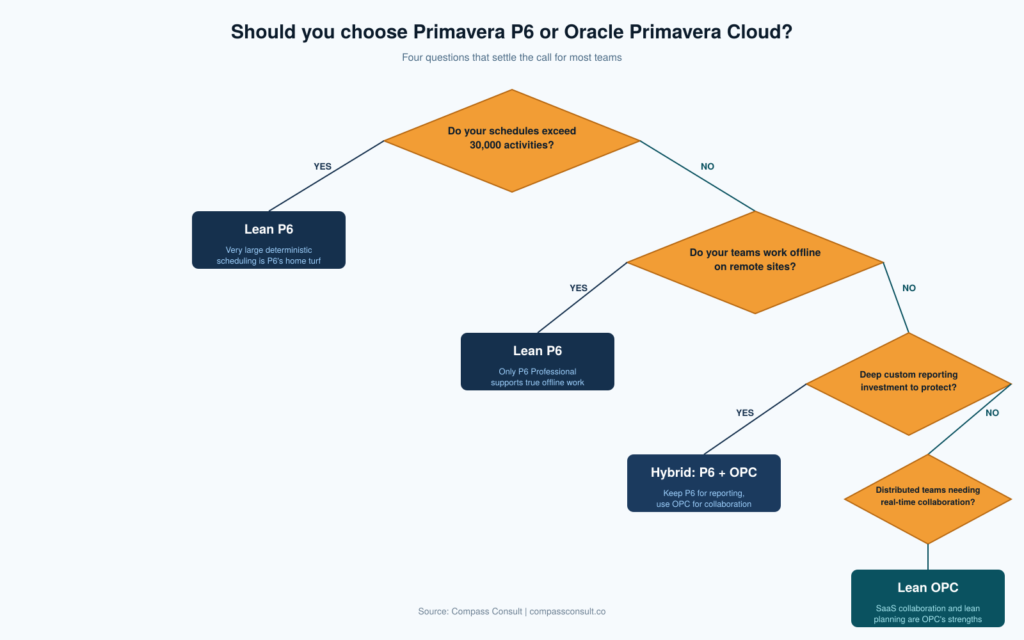
Choose Primavera P6 if:
- You run very large, complex schedules with tens of thousands of activities where the P6 Professional scheduling engine has no real cloud equivalent today
- Your planners live inside P6 Professional for delay-claims work, forensic schedule analysis or detailed resource levelling
- Your teams work on sites with unreliable or no connectivity and need true offline scheduling on the desktop
- You have deep BI Publisher, Primavera Analytics or custom reporting investments that would be expensive to rebuild
- You have mature in-house Oracle DBA capability and prefer the control of an on-premise or hosted P6 environment
- Your portfolio is stable and the perpetual licence has already been largely amortised
Choose Oracle Primavera Cloud if:
- Your teams are distributed across sites, joint ventures, states or time zones and need browser-based access without VPN
- You want CPM scheduling and lean or pull planning living inside the same product rather than stitched together
- Your PMO values predictable subscription delivery and bundled infrastructure over upfront capital outlay
- You are starting a new project controls capability without a long tail of P6 customisations to migrate
- You run several parallel workstreams that benefit from real-time multi-user editing and in-app collaboration
- You want Oracle’s forward investment path and monthly product updates rather than a multi-year upgrade cycle
For many organisations, the right answer is not purely one or the other. Hybrid environments, where P6 Professional continues to serve the scheduling team while OPC supports the wider project and portfolio community, are common and genuinely workable during a multi-year transition. The decision table below summarises the core trade-off.
| Decision Factor | Leans Toward P6 | Leans Toward OPC |
|---|---|---|
| Schedule size and complexity | Very large, deterministic | Small to large, collaborative |
| Offline scheduling need | High | Low |
| Team distribution | Co-located, mature IT | Distributed, lean IT |
| Reporting customisation need | High, custom BI | Standard dashboards |
| Delivery model preference | CapEx, perpetual | OpEx, subscription |
| Existing P6 investment | Deep, stable | Minimal, greenfield |
In practice: two real-world examples
Mega-project EPC, infrastructure and resources. On mega-rail, LNG, mining and deep-infrastructure programmes with 30,000 to 100,000 plus activity schedules, Primavera P6 Professional remains the default. London’s Crossrail Elizabeth Line is the most publicly documented example: the project’s own Learning Legacy library confirms P6 was the integrated master scheduling tool across the full delivery programme (Crossrail Planning and Scheduling Handbook, Crossrail Planning Manual PDF). The pattern across the global EPC community is consistent: when the schedule itself is the critical asset, forensic logic traceability matters and planners work on remote sites with patchy connectivity, P6 Professional wins. If your profile looks like this, start with P6 and consider OPC only for the portfolio and executive reporting layer above it.
Commercial construction, data centres and distributed PMO. On the other side, builders running commercial construction, fit-out, healthcare and distributed capital programmes have been early movers to Oracle Primavera Cloud. Oracle’s own published customer stories feature general contractors such as Walsh Brothers improving scheduling and collaboration with OPC, and Harkins Builders rolling out OPC across six decades of project delivery. The pattern here is consistent: when teams are spread across job sites, work involves lean pull planning alongside CPM, and the PMO wants a modern dashboard-first view of portfolio health, OPC’s bundled modules and browser-based workflow pay off faster than extending a P6 EPPM deployment.
If your project profile sits between these two, the pattern worth knowing is that many owners and contractors are running a hybrid: P6 Professional stays with the scheduling team on the heavy end, and OPC supports portfolio reporting, lean field work and distributed PMO activity. The decision is rarely binary in practice.
Oracle Primavera Cloud vs P6: Frequently asked questions
Is Oracle retiring Primavera P6?
No. Oracle continues to sell, support and release updates for Primavera P6 Professional and P6 EPPM, and current public roadmap signals do not point to an end-of-life announcement. What has changed is where Oracle is directing most of its new feature investment, which is clearly OPC. The practical read for teams is that P6 is safe to keep running for the foreseeable future, but net-new capability, especially around collaboration and modern UX, is landing in OPC first.
Can I run Primavera P6 and Primavera Cloud at the same time?
Yes. Many organisations keep P6 for existing mega-projects and use OPC for new work or for teams that need Lean, Cost Sheet or Forms. XER import / export moves schedules between the two, though not every field round-trips cleanly.
How do I migrate data from P6 to Primavera Cloud?
Migration tooling exists to move schedules, resources, calendars and codes from P6 into OPC workspaces. The schedule data itself usually comes across cleanly. The work is in redesigning the enterprise structure into workspaces, redefining global codes and resources inside workspace boundaries, rebuilding custom reports as dashboards, and re-pointing integrations. Treat it as a controlled project of three to six months rather than a single-click import.
Which is cheaper, P6 or OPC?
It depends on your team size, infrastructure maturity and integration footprint. OPC subscriptions tend to work out more cost-effective for small to mid-sized distributed teams and organisations without existing Oracle infrastructure. P6 tends to be more cost-effective for very large user bases where perpetual licences are already amortised and in-house IT is mature. For a like-for-like comparison against your specific scenario, request a tailored quote from Compass Consult.
Does Primavera Cloud replace Primavera Risk Analysis?
For most quantitative schedule risk analysis, yes. OPC’s risk module runs Monte Carlo simulations against the live schedule without a separate licence. For advanced correlation modelling, portfolio-level risk and bid-stage mega-project work, planners still often reach for Primavera Risk Analysis.
Which is better for construction and infrastructure projects?
Both are used widely across construction and infrastructure. P6 remains dominant on large tier-one civil, resources and energy projects where schedule size, forensic analysis and offline site access matter most. OPC is picking up ground on commercial construction, fit-out work, distributed infrastructure programmes and PMO environments that want a modern collaboration layer. The right choice depends on project profile, not sector alone.
How big a project can Oracle Primavera Cloud handle?
OPC is comfortable with small- and mid-sized schedules — typical commercial construction, fit-out, software, and industrial work. On schedules in the tens of thousands of activities with deep WBS and many logic ties, performance and feature parity still favour P6 EPPM. If you plan EPC, metro, LNG, nuclear or defence programmes, keep P6 in the stack.
Get a tailored Oracle Primavera recommendation
Choosing between Oracle Primavera Cloud and P6 is a decision that shapes how your planners, PMO and field teams work for the next several years. The right answer depends on your team size, delivery model, integration footprint and existing Oracle investment, not on a generic feature list. Compass Consult is an Oracle Primavera partner working with planners, contractors and owners across the world on licensing, implementation, migration and training for both P6 and OPC. Talk to our team for a tailored recommendation and quote built around your actual scenario or explore our project controls consulting services to see how we support teams end to end.