

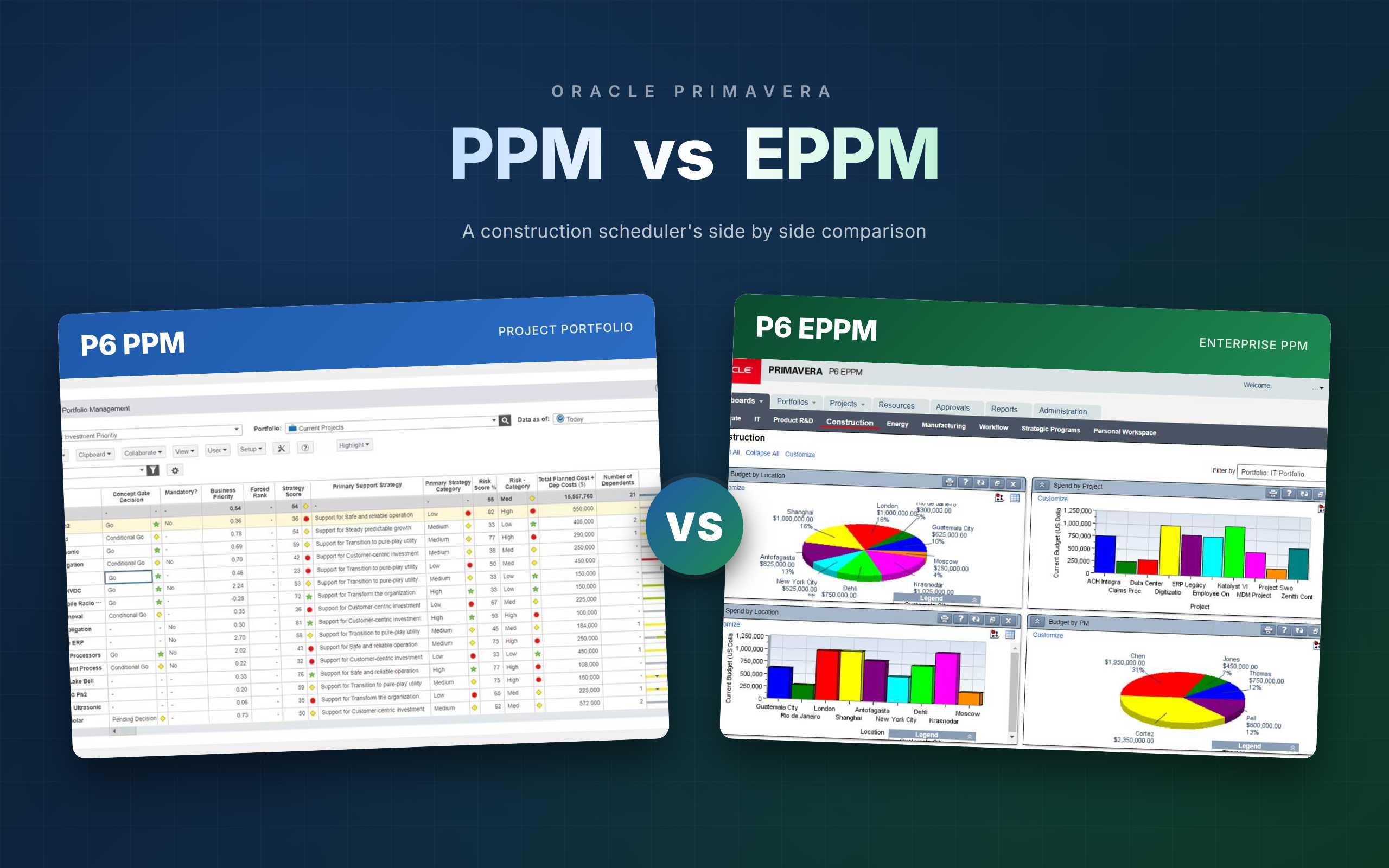
If you work in construction project controls, the choice between Primavera P6 PPM and EPPM is rarely academic. It shapes how your schedulers build the programme, how your site teams update progress, how you defend an EOT claim, and how your client sees the job. With 72% of construction firms reporting that projects take longer than anticipated[1] and 98% of megaprojects running late or over budget[2], picking the right P6 deployment is a small decision with an outsized impact on your delivery risk.
This guide compares Primavera P6 PPM and EPPM through a construction lens. It covers architecture, pricing, role fit for schedulers and project controls managers, and the real workflows (baseline control, delay analysis, progress reporting) where one version pulls ahead.
Primavera P6 PPM and EPPM at a glance
Both products share the same scheduling engine and open the same XER exchange format, so a planner trained on one can work on the other. The split is about deployment, scale, and who else in the business needs to see the schedule.
| Dimension | P6 PPM (Professional) | P6 EPPM (Enterprise) |
|---|---|---|
| Platform | Windows desktop client | Browser based web client + optional Windows client |
| Database | SQLite, Oracle XE, or SQL Server (local or shared) | Centralised Oracle or SQL Server (server or cloud) |
| Best for | Individual schedulers and small planning teams | Enterprise programmes, distributed teams, client reporting |
| Collaboration | Shared database or XER exchange | Multi-user web access, Team Member Web, mobile apps |
| Dashboards | Basic reports, Visualizer | Interactive dashboards, pivot tables, BI Publisher |
| Timesheets | Not included | Built in |
| Portfolio management | Not included | Included |
| Offline use | Yes | No (browser requires connectivity) |
If you remember one thing: PPM is where the schedule gets built, EPPM is where the business consumes it.
What is Primavera P6 PPM, and where does it fit?
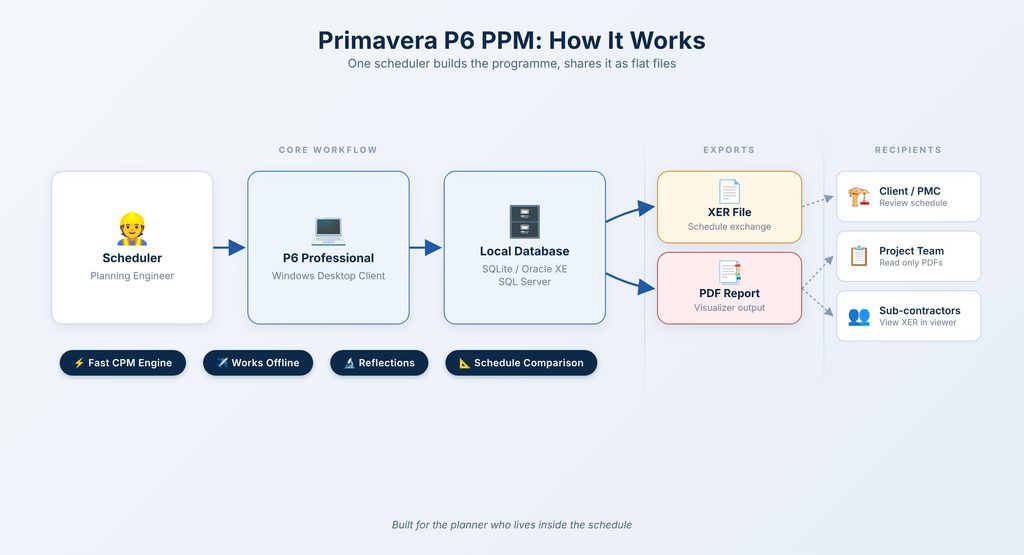
Primavera P6 PPM, often just called P6 Professional, is the Windows desktop client that most schedulers in construction actually learned on. It installs locally and connects to a database that sits on your laptop (SQLite), a small server (Oracle XE), or a shared SQL Server instance for a planning team.
The product is built for the planner who lives inside the schedule. Keyboard shortcuts, dense activity views, drag and drop logic editing, and native calculation speed on large networks make it the preferred tool for building and maintaining a baseline programme of 10,000 activities or more. It works offline, which matters for site based planners travelling between a camp, a project office, and a client workshop in a single day.
How schedulers actually use it in the field
Among planning professionals, the common pattern is simple. The scheduler builds and maintains the master programme in P6 Professional, exports an XER or a PDF to share with the project team, and uses local reflections to test what-if scenarios before committing changes to the baseline. Discussion among experienced planners typically frames the Windows client as the full tool for serious planning work and the web client as a lighter interface for everyone else. That view is not universal (EPPM has closed many gaps), but it still drives a lot of tooling decisions on tier-one projects.
Strengths and limits
Strengths: fast CPM calculation, mature filtering and grouping, offline capability, Reflections for safe what-if analysis, and the Schedule Comparison tool for XER to XER delay forensics. Limits: no native multi-user collaboration on a single schedule in real time, no built in enterprise timesheets, no portfolio roll up across programmes, and no out of the box dashboards for executives.
What is Primavera P6 EPPM, and who does it serve?
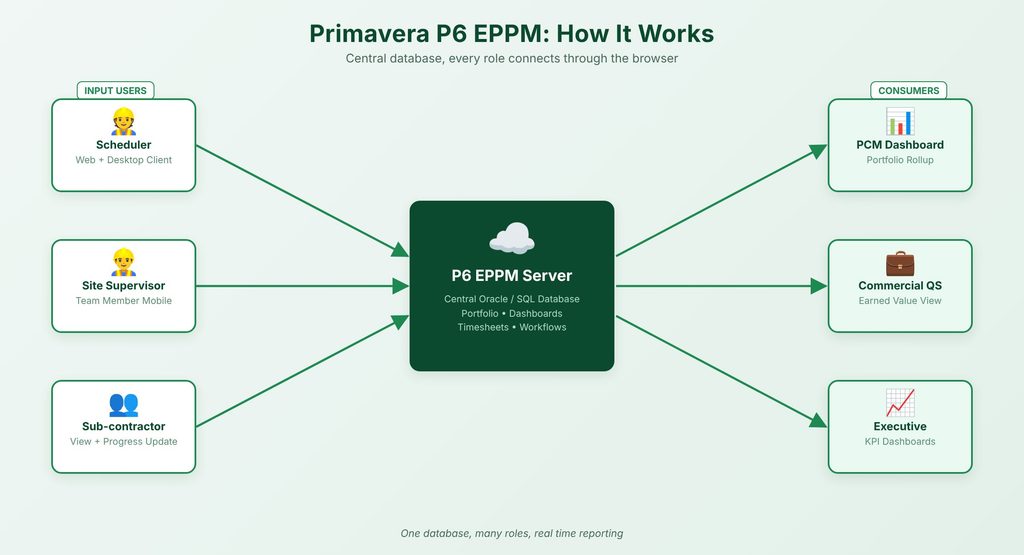
Primavera P6 EPPM (Enterprise Project Portfolio Management) is Oracle’s browser based platform for running P6 at scale. It hosts a centralised Oracle or SQL Server database, delivers a web client to every user, and bundles Team Member Web, mobile apps, interactive dashboards, timesheets, and portfolio management on top. An EPPM licence also includes the Windows Optional Client, so a power scheduler can still open the enterprise database in the familiar desktop interface.
EPPM is typically specified when the schedule has to serve more than one person. Head contractors on multi-package programmes, Project Management Consultants running works for a client, and asset owners tracking a pipeline of capital projects are the natural buyers. KPMG research shows 81% of engineering and construction firms are adopting mobile platforms[3], and EPPM is the version of P6 that supports that shift natively.
The enterprise layer explained
Where PPM gives you one schedule at a time, EPPM gives you an Enterprise Project Structure (EPS) that rolls packages into projects, projects into programmes, and programmes into portfolios. Add a shared Organizational Breakdown Structure (OBS) on top, and you can tie every activity to the party accountable for delivering it. That structure is the reason 83% of firms list improved estimating and controls accuracy as a top priority: without it, consolidated reporting is a spreadsheet exercise.
Who typically rolls it out
Bigger contractors and government clients. If the business case has to reach a CFO, a CIO, or a programme director, EPPM is almost always the answer, because the dashboards, user management, and audit trails are what those readers expect.
Primavera P6 PPM vs EPPM: a ten criteria comparison
The table below is the one most planners want on a single screen. Read it with your own context in mind: a tier-two subcontractor running three jobs will weigh these criteria very differently from a client-side PMC managing a billion-dollar programme.
| Criterion | P6 PPM | P6 EPPM |
|---|---|---|
| Architecture | Fat client on local DB | Web client on central DB, Java stack |
| Installation | Per workstation install | Server rollout, zero install for end users |
| Access and mobility | Desktop only, works offline | Any modern browser, Android and iOS apps, no offline |
| Collaboration | Shared DB or XER exchange | Real time multi user, Team Member Web progress updates |
| Portfolio and programme | Project level only | EPS roll up, portfolio prioritisation, capacity planning |
| Dashboards and reporting | Report wizard, Visualizer, basic exports | Interactive dashboards, pivot tables, KPIs, BI Publisher |
| Timesheets | Not included | Included (P6 Team Member, Progress Reporter) |
| What-if analysis | Reflections and Schedule Comparison (PPM only) | Project templates and global search and replace |
| Integration | XER, SharePoint, third party add ons | SharePoint, BIM, JD Edwards, PeopleSoft, REST API |
| Licensing model | Named user, perpetual or subscription | Named user, perpetual or subscription, includes Optional Client |
Architecture and the data model
PPM calculates locally: the CPM engine runs on your CPU and reads from a database on your disk or LAN. That is why it feels fast even on a 20,000 activity schedule. EPPM pushes that work to a server and the user interface to a browser, which adds a hop. Over a reliable network it is barely noticeable; on a remote site with poor connectivity it can be the difference between a planner working and a planner waiting.
Mobility, site updates, and connectivity
EPPM wins on mobility by a clear margin. Progress updates from site supervisors, timesheets from direct labour, and view only access for sub-contractors are all native. PPM owners typically bolt on a viewer product or a custom process to achieve the same thing. If your project has field teams updating actuals weekly, EPPM is the lower friction choice.
Portfolio management and dashboards
This is the clearest line in the comparison. Portfolio management does not exist in PPM. If your organisation has to prioritise capital across a pipeline of projects, or report delivery status to a board, you are either using EPPM or you are rebuilding that view in Power BI every month.
Which Primavera P6 version suits each construction role, PPM or EPPM?
Most comparisons stop at organisation size. In reality, the decision is cleaner when you look at the specific people who touch the schedule every week.
| Role | Primary tool | What they lose with the other version |
|---|---|---|
| Planner or Scheduler | PPM Windows client | On EPPM web only: slower bulk edits, no Reflections, no Schedule Comparison |
| Project Controls Manager | EPPM web client (with PPM Optional for deep dives) | On PPM only: no dashboards, no portfolio view, manual consolidation |
| Commercial / QS Manager | EPPM dashboards | On PPM only: no live earned value view, read only PDFs from the scheduler |
| Site Engineer or Supervisor | EPPM Team Member Web or mobile | On PPM only: no way to update actuals without the scheduler keying them in |
| Project Director | EPPM dashboards and reports | On PPM only: scheduler-produced PDFs, no self serve drill down |
| Executive Sponsor | EPPM portfolio dashboards | On PPM only: no portfolio view at all |
Schedulers and planning engineers
Schedulers almost always prefer the Windows client. The common refrain in planning communities is that experience built only on the web client leaves gaps in a scheduler’s toolkit, particularly around Reflections, Global Change, and the Schedule Comparison utility. Plan for your schedulers to use PPM (either standalone or the Optional Client that ships with EPPM) even if everyone else in the business lives in the browser.
Project controls and PMO
PCMs sit between the scheduler and the client. They need portfolio roll up, trend reporting, and earned value, all of which are EPPM territory. A PCM running a programme on PPM alone usually ends up pulling XER exports into Power BI every Friday, which is tolerable at one project and unsustainable at ten.
Commercial, QS, and site leadership
These users rarely need to edit activities. What they need is a live view: percent complete by package, forecast end date, float erosion, and payment milestones. EPPM dashboards cover those in minutes. On a PPM only deployment, the same information requires the scheduler to run and distribute a report, which is why most construction firms running EPPM say the single biggest unlock is giving commercial and site leaders their own read access.
How the P6 PPM and EPPM choice plays out on a construction programme
Consider a head contractor delivering a civil infrastructure package with five sub-contractors, a 24 month duration, and a fixed-price contract with monthly progress claims. Schedule discipline here is not optional. Rework costs 4% to 6% of project value on average and up to 9% once indirect costs are included, and 68% of trades name poor schedule management as a top productivity killer. The Primavera deployment you choose dictates how you fight those numbers.
Baseline and progress updates
On PPM, the scheduler owns the baseline file, saves a reflection each month, and keys in actuals from timesheets and site reports. On EPPM, foremen can enter percent complete through Team Member Web or the mobile app, and the scheduler reviews and accepts those updates before the monthly cut off. The EPPM path removes a day of double entry and cuts the dispute surface area with sub-contractors because their own progress numbers are in the system.
Delay analysis and EOT evidence
PPM pulls ahead here. The Schedule Comparison utility (PPM only) produces a clean activity by activity diff between XER snapshots, which is the backbone of time impact analysis and EOT substantiation. With construction disputes now averaging 14.4 months, a scheduler who can produce defensible delay evidence on demand is worth more than any dashboard. Most PCMs who run EPPM across the business still keep the Optional Windows Client installed on their delay analyst’s laptop for exactly this reason.
Reporting to the client and the board
One client-side view: a dashboard with programme health, cash curve, milestone status, and float erosion, refreshed in real time. This is where EPPM earns its licence fee. PPM can produce the same view through Visualizer and Excel, but only through the scheduler, and only on the day they have time.
Pricing and licensing of PPM vs EPPM
Oracle’s commercial model is where many contractors get caught out. Both PPM and EPPM are sold on a named user basis, available as perpetual licences with annual support or as cloud subscriptions through Oracle Construction and Engineering Cloud. Pricing changes often enough that the only safe source is a current Oracle price list or a quote from an authorised partner, but the shape of the decision is consistent.
A PPM named user licence costs less upfront than an EPPM named user licence, and support renewals follow the same ratio. However, an EPPM licence includes the Optional Windows Client, so a buyer is not choosing one product or the other. They are choosing a deployment model. For planning teams of fewer than five full licence users with no field update needs, PPM is almost always cheaper over a five year window. Beyond that user count, the cost per user curve favours EPPM once you add the infrastructure and administration overhead PPM needs to scale.
Licence models and support
Perpetual licences remain popular with established contractors because capex suits their accounting. Subscription licences dominate new buyers, PMC firms, and anyone wanting a fast on-ramp to Oracle Primavera Cloud. Factor in Oracle’s standard 22% annual support fee when comparing total cost.
Buying
Most buyers go through an authorised Oracle Primavera partner rather than Oracle direct. A partner handles implementation, migration, training, and local support in your timezone, which matters more than a 5% discount on the licence. Expect a competent partner to run a two week discovery before quoting EPPM, because the server sizing and SSO integration drive the real cost.
Where Oracle Primavera Cloud fits alongside P6 PPM and EPPM
Many buyers assume Oracle Primavera Cloud (OPC) is a rename of EPPM. It is not. OPC is Oracle’s newer SaaS platform that combines CPM scheduling, risk management, lean task management, and project financials in one browser interface. P6 (both PPM and EPPM) remains Oracle’s workhorse for detailed CPM scheduling, and Oracle’s public roadmap keeps both products on the shelf. Learn more about the difference in this article: Oracle Primavera Cloud vs P6.
OPC in one paragraph
OPC is cloud only, subscription only, and designed for the full project lifecycle including risk, cost, and field execution. It can import an XER from P6 and run it, but it is not a drop in replacement for either PPM or EPPM today. Treat it as a complementary platform, often adopted alongside P6 rather than instead of it.
Why this matters for your decision
If your organisation is already standardising on Oracle’s cloud stack, ask your partner for a P6 EPPM plus OPC bundle and get a clear statement of how the two products integrate for your use case. If you are a scheduling-heavy contractor with no cloud mandate, stick with P6 (PPM or EPPM) and revisit OPC in 12 to 18 months as its CPM feature set matures.
Migrating between Primavera P6 PPM and EPPM: can you move later?
Yes, and most growing contractors do. The usual journey is PPM first for a small planning team, then EPPM once the business starts demanding programme level reporting or field access.
From a PPM database to EPPM
Migration is a database conversion rather than a rebuild. Projects, EPS structures, baselines, calendars, codes, and user defined fields carry across. What does not carry cleanly: local user preferences, some private filters and layouts, and any custom reports that were built in the PPM report editor rather than in Visualizer. Plan for a parallel run of at least one full reporting cycle. Your Oracle partner should quote the migration as a fixed-price package.
Running both in parallel
Many organisations run EPPM for reporting and collaboration while keeping a small number of PPM power users for deep scheduling and delay work. This is the pragmatic middle path and is often the final state, not a transition. Oracle does not penalise this; the EPPM licence already includes the Optional Windows Client, and any additional standalone PPM licences for forensic analysts are a modest extra cost.
How to decide between P6 PPM and EPPM for your business
The five-question test
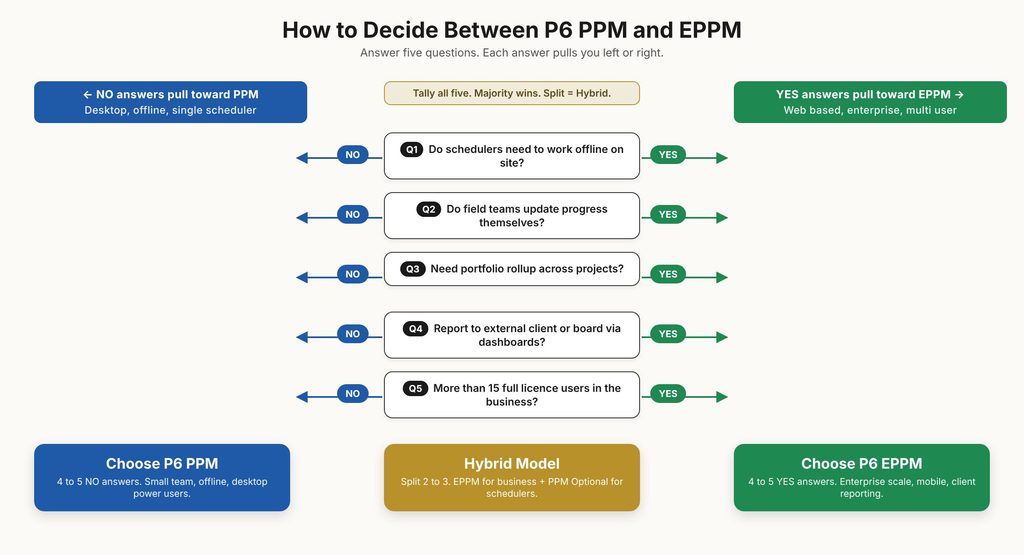
- Do your schedulers need to work offline on site, in camp, or on travel? If yes, PPM.
- Do field teams (foremen, supervisors, sub-contractors) need to update actual progress themselves? If yes, EPPM.
- Do you need a portfolio roll up of more than one project for internal or client reporting? If yes, EPPM.
- Do you report programme status to an external client, a board, or an executive sponsor who expects dashboards? If yes, EPPM.
- Do you have more than 15 full licence users across the business? If yes, EPPM.
If four or five answers point to EPPM, buy EPPM. If four or five point to PPM, stay on PPM. A split result points to the hybrid model: EPPM for the business, PPM Optional Client for your schedulers and delay analysts.
When a hybrid makes sense
The hybrid pattern suits most tier-one and tier-two contractors above 50 million in turnover. Only 16% of E&C executives report fully integrated systems, which means most firms already live with mixed tooling. A deliberate PPM plus EPPM hybrid, with a clear workflow for when each is used, is usually better than an all-or-nothing deployment that fights the way people actually work.
Frequently asked questions about Primavera P6 PPM vs EPPM
Is Primavera P6 Professional the same as PPM?
Yes. Oracle sells the Windows desktop client under the name Primavera P6 Professional, and the PPM label describes the deployment model (Project Portfolio Management on a local or shared database). The two terms refer to the same product in almost all buying conversations.
Can PPM and EPPM open the same database?
Not by default. A PPM database can only be opened by the Windows client. An EPPM database can be opened by both the web client and the Optional Windows Client that ships with every EPPM licence. This is why most hybrid deployments standardise on an EPPM database and give power schedulers the Optional Client for their deep work.
Which version do large construction firms use?
Tier-one contractors and government clients typically run EPPM for the enterprise and let power schedulers use the Optional Windows Client for detailed work. Mid-tier contractors often start on PPM and migrate to EPPM when they win their first major programme or client that demands dashboards. Subcontractors and specialist firms usually stay on PPM.
Does EPPM work offline?
No. EPPM is a web application and requires a connection to the server. If offline work is critical, the Optional Windows Client (included with an EPPM licence) can work against a local database export and re-sync.
Is Oracle Primavera Cloud replacing EPPM?
No, not on the current public roadmap. Oracle Primavera Cloud is a separate product that targets integrated project delivery across schedule, risk, cost, and field execution. Oracle continues to invest in and release updates for P6 EPPM alongside OPC.
Do I need separate training for PPM and EPPM?
The scheduling engine is the same, so core CPM concepts transfer in both directions. However, the user interfaces are different enough that a PPM-trained scheduler will need half a day to become productive in the EPPM web client, and an EPPM-only user will need a day or two to become fluent in the Windows client for deep editing and delay analysis.