Category: Oracle Primavera Cloud

  • Should You Move from Primavera P6 to Oracle Primavera Cloud?

    Should You Move from Primavera P6 to Oracle Primavera Cloud?

    One of the most common misconceptions we come across is that Oracle Primavera Cloud is simply Primavera P6 with a modern interface.

    If you’re finding a Primavera partner in Australia, it’s worth understanding that the choice isn’t just between two pieces of software. The right implementation partner should help you assess your project controls maturity, reporting requirements and long-term business objectives before recommending whether Primavera P6 or Oracle Primavera Cloud is the better fit.

    It isn’t.

    Both platforms share the same scheduling DNA; activities, logic, calendars, resources, and baselines remain fundamental. But they were built to solve different problems, and understanding that distinction is the first step in deciding whether a move makes sense for your organization.

    What’s Actually Different

    Primavera P6 has earned its reputation over decades as one of the most capable scheduling tools available. It excels at building and managing complex project schedules, which is why it remains the preferred choice for large construction, infrastructure, mining and energy projects where detailed planning and control are critical. 

    Primavera Cloud takes that scheduling capability and places it inside a broader project controls environment. Instead of focusing primarily on the schedule, it connects planning, portfolio management, risk analysis and cost information into a single source of truth.

    The differences show up less in scheduling mechanics and more in how information moves across projects, teams and stakeholders.

    Why the Difference Matters

    Many organizations still manage schedules in Primavera P6, costs in a separate application, and risk registers in spreadsheets. Each system does its job well on its own. The cost shows up when project controls teams have to reconcile data across all three before they can even start analyzing it; we’ve seen teams lose days each month to that reconciliation alone, with some of the numbers already stale by the time reports reach decision-makers.

    Primavera Cloud brings scheduling, cost, risk and portfolio reporting into one environment. The value isn’t convenience for its own sake; it’s that decision-makers spend their time interpreting information instead of assembling it.

    Risk analysis is built in, not bolted on.

    Rather than running quantitative risk analysis as a separate exercise after the schedule is built, Primavera Cloud lets teams evaluate uncertainty alongside planning. For organizations managing major capital projects, that tends to produce sharper forecasting and a more honest picture of delivery confidence for stakeholders. Software doesn’t eliminate risk; identifying what matters, keeping information current, and revisiting assumptions is still the team’s job. The platform just removes friction from doing that well.

    It’s built for portfolios, not just projects.

    P6 is exceptional at managing a single project in depth. Primavera Cloud is built for organizations juggling many at once, where executives need to see how a delay in one program affects funding or resourcing across others. That matters most for organisations running multiple concurrent infrastructure or capital projects, where priorities shift constantly.

    It’s built for wider collaboration.

    Project controls no longer sit exclusively with the planning office; project managers, commercial teams, executives and clients all expect faster access to accurate project data. Because Primavera Cloud is browser-based, more people can work from the same data without installing anything locally. That doesn’t replace disciplined review and clear ownership of who signs off on what; it just widens who can see accurate information without waiting on the planning team.

    Migration Is Usually Less Painful Than Expected

      The concern we hear most often: will years of investment in P6 schedules be lost?

      In most cases, no. Existing P6 schedules can generally be imported into Primavera Cloud, so organizations build on established planning practice rather than starting from zero.

      That said, migration isn’t a purely technical exercise. Before transitioning, test representative project schedules, validate reporting requirements, and confirm that finance, ERP and other system integrations still hold up. The organizations with the smoothest migrations treat implementation as a business change project, not a software upgrade, with clear governance over who approves the cutover, who owns data validation, and who signs off before the old system is retired.

      Why Project Controllers Are Paying Attention

      For project controllers, the real question isn’t whether Primavera Cloud has more features than P6. It’s whether it helps them do the job better. Most controllers are measured by the quality of their forecasts, the reliability of their reporting, and how early they catch problems, not by how sophisticated their software is.

      The conversations we actually have with clients rarely start with software. They start with:

      “Our monthly reporting takes too long.” “We’re constantly reconciling cost and schedule data.” “Leadership wants better visibility across projects.” “Different teams are working from different versions of the truth.”

      These aren’t scheduling problems. They’re project controls problems, and better software only solves them when it’s paired with clear data ownership and consistent update discipline. Software provides the platform. Good project controls practice delivers the outcome.

      When Staying on P6 Is the Right Call

      Clients come to us for objective advice, not a recommendation to buy something new, and sometimes the right advice is to stay exactly where you are.

      P6 remains one of the most capable scheduling platforms available and continues to support some of Australia’s largest, most complex projects. If your organization primarily manages individual projects, has mature reporting processes, and isn’t struggling with portfolio visibility or cross-team collaboration, Primavera Cloud may not be worth the cost.

      And if your project controls processes are still maturing, a new platform won’t fix that on its own. Technology can’t compensate for inconsistent updates, unclear ownership, or poor data quality; those are process problems first.

      How to Actually Evaluate It

      Skip the feature comparison and the vendor demo; they rarely reflect the complexity of your actual projects. Instead:

      Import a representative schedule. Test your real reporting requirements. Review how cost, risk and schedule data interact. Assess how your review and sign-off processes would work in the new environment. And involve the people who’ll actually use it: planners, project controllers, commercial managers, not just IT or procurement. Their feedback tells you far more than any demo about whether the platform fits how your organization actually delivers projects.

      At Compass Consult, that’s the question we ask: not “can Primavera Cloud do this,” but will it help this organization make better project decisions? It’s a subtle shift, but it’s usually the line between a successful implementation and an expensive deployment.

      Frequently Asked Questions

      Is Oracle Primavera Cloud replacing Primavera P6?

      No. They’re separate products built for different purposes. P6 remains a leading scheduling solution; Primavera Cloud extends beyond scheduling into portfolio management, integrated risk analysis and cross-team collaboration.

      Is Primavera Cloud just P6 in a browser?

      No, and it’s the most common misconception we hear. P6 EPPM already has web-based functionality. Primavera Cloud is a cloud-native platform with different architecture and a broader scope, built around portfolio planning, risk and cost management as much as scheduling.

      Does moving to Primavera Cloud automatically improve reporting?

      Only if it’s paired with good practice. The platform gives you connected data and faster reporting, but disciplined schedule updates, accurate progress measurement, and clear ownership of project information still do the heavy lifting. Technology enables better reporting; it doesn’t replace the work behind it.

      Final Thoughts

      Choosing a project controls platform isn’t really a software decision. It’s about how confidently your organization can predict and deliver project outcomes.

      Oracle Primavera Cloud connects planning, portfolio management, cost and risk into one platform, and for organizations running major capital programs or multiple concurrent projects, that can meaningfully improve visibility and decision-making. But newer isn’t automatically better. P6 remains one of the most trusted scheduling platforms in the industry, and for many organizations, it’s still the right fit.

      The organizations that get the best outcomes aren’t necessarily running the newest software; they’re the ones pairing the right technology with disciplined process and people who know how to turn project data into decisions. That’s where an experienced implementation partner earns its place.

      At Compass Consult, we know that finding a Primavera partner in Australia is about more than selecting someone who can install software. We’ve spent years helping construction, infrastructure, mining and energy organisations strengthen their project controls capability, whether that means implementing Primavera Cloud, optimising an existing P6 environment, or simply working out which platform best fits the business.

      The right decision isn’t about the newest technology. It’s about the technology that gives your organization genuine confidence in delivering projects.
    • Oracle Primavera Cloud: A Comprehensive Understanding

      Oracle Primavera Cloud: A Comprehensive Understanding

      Oracle Primavera has long been a trusted name in project management, with its suite of tools evolving over the years to meet the changing needs of the industry. With the introduction of Oracle Primavera Cloud (OPC), Oracle has stepped up to produce a whole new league of project management software, offering a comprehensive, cloud-based solution. 

      In the sections below, you will find a consolidation of information, detailing Oracle Primavera Cloud, its features, how it compares against competitive platforms, its various modules and, perhaps most importantly how its pricing and licensing options work.

      Recognising the difference between Oracle Primavera Cloud(OPC) and Primavera P6 EPPM Cloud(SAAS)

      Since the original Primavera P6 was acquired by Oracle in 2008, the product set has grown significantly and now includes multiple applications. This has come about mainly through acquisition but also includes some newly developed software. Out of all the cloud solutions provided by Oracle, Oracle Primavera Cloud (aka Prime) and Oracle P6 EPPM Cloud(SAAS) stand out the most in the industry. 

      Having been around for the last 30 years, Oracle P6 EPPM and its schedule management is the gold standard and a proven method for organisations to manage schedules, portfolios, resources, risks and issues. On the other hand, Oracle Prime is a fairly modern cloud solution that mostly banks on lean project management technology with a plethora of new project control features loaded into one. The following gives a basic comparison of both.

      Primavera P6 EPPM versus OPC

      P6 EPPM is the flagship product for globally prioritizing, planning, managing, and executing projects, programs, and portfolios. P6 EPPM comprises two components: P6 Web Access and P6 Professional. These applications can be deployed on-premise, on the Oracle cloud, or on other non-Oracle-hosted platforms.

      Meanwhile, Primavera Cloud (previously known as Prime) is the ultimate jack-of-all-trades in the Oracle Primavera arsenal. A comprehensive, cloud-based solution, it comprises tools that allow executives, project members and field users to deliver projects and portfolios effectively, efficiently, and with confidence. The huge range of functions spans:

      • Project and portfolio scheduling
      • Resource management
      • Project costing
      • Project and portfolio selection and management
      • Risk management and analysis
      • Contract and change management (including budget management and funding management)
      • Project collaboration (including functionalities like inspections)
      • Primavera Cloud also provides a native, purpose-built mobile application that allows users to access portfolios, projects, documents, scope and activity-related information in both online and offline mode.


      Let’s dive deeper into how they are different:

      • Enterprise Structure:

      P6 EPPM has EPS for keeping your projects grouped based on Programs and Portfolios, whereas OPC replaces them with newly introduced Workspace.

      • OBS has been replaced with security to access the workspace in OPC.
      • Code and UDFs options are available similar to P6 EPPM with some additional codes i.e (report code)
      • OPC has default business flows for creating new projects.
      • Resource Master:

      In OPC, resource breakdown design is given at different Workspace levels and related promotion options. In EPPM, Resource master consists of global data available at the enterprise level and is distributed among Projects.

      No standard business flow is available to transfer the resource master among other ERPs (for example – SAP HR), whereas standard business flows are available in P6 EPPM. Custom Integration is required to fulfill such requirements using REST APIs or Primavera Gateway.

      • Project Initiation:

        OPC brings in this feature which is absent in P6 EPPM. The idea is the feature helps to manage the investment plan. This excellent feature is almost the same as OPPM (Oracle Primavera Portfolio Management). Hence, there is no need to buy separate products to manage Investment management if needed.

      • Project Planning & Costing:
        • There are five types of activity types in OPC – Activity-Dependent, Resource-Dependent, Start Milestone, Finish Milestone, and Level of Effort in OPC.
        • WBS Summary Activity type is completely removed in OPC which is present in P6 EPPM and is a very useful method to calculate Project Management Activities.
        • OPC has the inbuilt Schedule sheet, Cost Sheet, CBS structure to help manage the costing. Features are taken from Project Controls. For EPPM, generally a separate and dedicated tool is given for Project Controls.
        • OPC does not have any standard business flows to transfer the data from ERPs (SAP PM, SAP PS, Oracle EBS, etc) and a product like Unifier, Ecosys, etc.
      • Scheduling & Schedule Check:
        • Both are quite similar.
        • Schedule logs are available, the same as P6 EPPM which is missing in OPC.
      • Collaboration:
        • The inbuilt team member application (Timesheet) helps to communicate and collect the progress from users, whereas in P6 EPPM this is separately licensed. However, Compass cloud solutions come with Team Member integrations so the feature is similar to OPC.
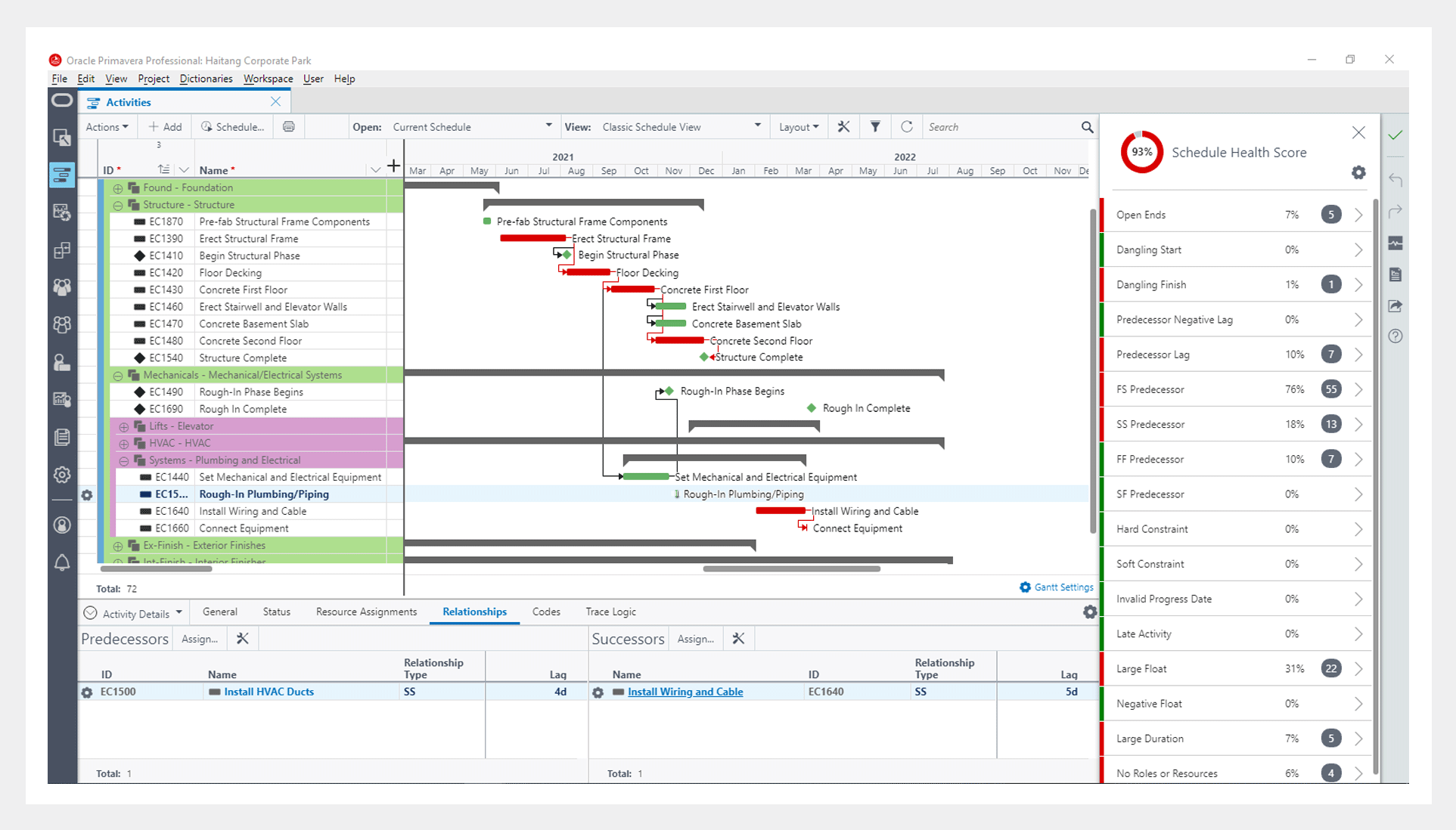
        • P6 EPPM comes with the P6 Professional Client tool which can use the same features of scheduling and managing project data. It has the same data access as the EPPM. P6 Professional and is the most widely used scheduling tool by Project Managers and Planners. No amount of cloud features can be compared to the Professional Desktop Client features for fast processing of Project Activities. OPC does not come with a P6 Professional use license, and a Professional client can only be used for Project File Type conversions.
      • Risk Analysis:
        • A full-fledged integrated risk management capability is available in OPC. EPPM has a simple risk module for qualitative risk analysis.
        • Activity uncertainty and Monte Carlo Simulation are available in OPC and missing in EPPM. EPPM can be integrated into Primavera Risk Analysis (a separate desktop client tool) for detailed simulation and modeling.  
      • Integration:
        • Primavera Gateway and REST API are the other options to integrate with other applications and ERPs. However, EPPM has standard integration points which the OPC does not have.
        • No standard business flows are available for the other integrations in OPC.
        • P6 EPPM supports multiple integration options and business flows available to integrate with ERPs and other applications, i.e. SAP PM, SAP PS, SAP MM, SAP HR, Oracle EBS, EAM, JD Edwards, IBM Maximo, Navisworks, Smart plant 
        • Constructions.
      • Resource Analysis:
        • Almost the same as P6.
        • Portfolio
          • The P6 EPPM Portfolio capabilities are missing in the OPC version, i.e., portfolio analysis, Capacity planning, Performance Status, etc.
        • Leaner schedule programs are yet another excellent feature introduced in the OPC version.
      • Reports:
        • Inbuilt BI Publisher-based reports are available. However, the P6 EPPM Compass cloud comes with BI integration and Primavera Analytics, which provides many more features in reporting and analysis than OPC.
      • Implementation:
        • P6 EPPM is fairly simple to implement when compared to OPC. A lot of structures and business flows need to be customised in OPC for the client before they can start using the system. Whereas, in P6 EPPM, you can start scheduling and managing projects with simple and minimal configurations.
      • Licensing:
        • Licensing in OPC is fairly complicated yet robust. Users have to buy separate modules for all the features mentioned above.

      Both P6 EPPM Cloud and Oracle Primavera Cloud are excellent cloud-based Project Management solutions. Primavera Cloud provides a few new features of Project Controls along with scheduling and master data controls. If you are an organisation that wants to have access to the latest features and would prefer to work on web browsers, then OPC is your clear winner.


      Sidebar: One question we often get is, “ What are the advantages of using Oracle Primavera Cloud over MS Project?”
      Here’s our response along with a detailed breakdown by our Director and Lead Consultant, Girish.


      1. Inbuilt Mobility and Role-Based Architecture: OPC offers built-in mobility and role-based architecture, allowing users to access project data and functionalities from any location and ensuring secure access control based on user roles.

      2. Desktop & Mobile Application for Schedule Management: OPC provides both desktop and mobile applications for schedule management, enabling users to efficiently manage project schedules on various devices, enhancing flexibility and productivity.

      3. Involvement and Collaboration with All Stakeholders: OPC facilitates involvement and collaboration with all project stakeholders through its robust collaboration features, ensuring effective communication and coordination throughout the project lifecycle.

      4. Progress Reporting and Site Management: OPC offers comprehensive progress reporting and site management capabilities, allowing users to track project progress in real time and manage on-site activities efficiently.

      5. In-depth Demand Planning and Resource Management: OPC provides in-depth demand planning and resource management features, enabling users to accurately allocate and manage resources based on project requirements, leading to optimized resource utilization.

      6. Strength of Work Breakdown Structures: OPC offers strong support for work breakdown structures (WBS), allowing users to effectively organize and manage project tasks and activities hierarchically.

      7. 100% Cloud-Based Architecture, No Need for Physical Hardware Maintenance: OPC’s 100% cloud-based architecture eliminates the need for physical hardware maintenance, reducing IT overhead costs and providing scalability and accessibility.

      8. Multiple Workflow Solutions Under One Software: OPC integrates multiple workflow solutions within a single software platform, streamlining project management processes and enhancing efficiency.

      9. Portfolio Management: OPC includes robust portfolio management capabilities, allowing users to evaluate and manage portfolios of projects effectively, ensuring alignment with organizational goals and objectives.

      10. Cost Sheet & Cost Management: OPC offers comprehensive cost sheets and cost management features, enabling users to track and manage project costs accurately throughout the project lifecycle.

      11. Risk Analysis using Monte Carlo Simulation: OPC provides advanced risk analysis capabilities using Monte Carlo simulation, allowing users to assess project risks and uncertainties more accurately and make informed decisions

      12. Easy Resource and Role Analysis: OPC offers easy resource and role analysis tools, allowing users to analyze resource allocations and roles within projects effortlessly, ensuring optimal resource utilization.

      13. The Power of Primavera Scheduling: OPC leverages the power of Primavera scheduling, offering robust scheduling capabilities that enable users to create and manage complex project schedules with ease and precision.

      14. File Management: OPC includes efficient file management features, allowing users to organize, store, and share project documents and files securely within the platform.

      The various types of Oracle Primavera Cloud Licenses

      There are four licenses designed to meet the needs of your organization. Licenses determine what apps, pages, functionality, and mobile apps a user has access to.

      Schedule License: For power schedulers to prioritize, plan, manage, and evaluate projects across your organization.

      Portfolio License: For portfolio planners to propose and manage the portfolios across your organization.

      Progress License: For users who only need access to their activities and timesheets.

      Tasks License: For schedulers that use task management to manage their projects.

      Licenses are distributed according to the license model:

      • If you have the Named Users license model, then you will assign available licenses to users.
      • If you have the Project license model, then all users will automatically receive the Schedule license, the Tasks license, and the Progress license.
      • If you have the Enterprise Schedule license model, then all users will automatically receive the Schedule license, the Tasks license, and the Progress license.
      • If you have the Enterprise Portfolio Planning license model, then all users will automatically receive the Portfolio license.

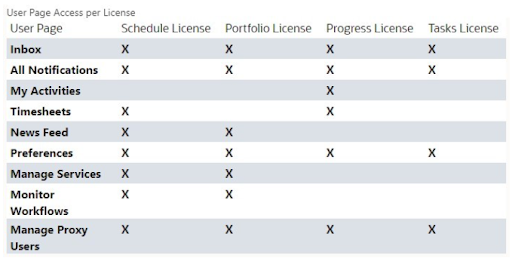
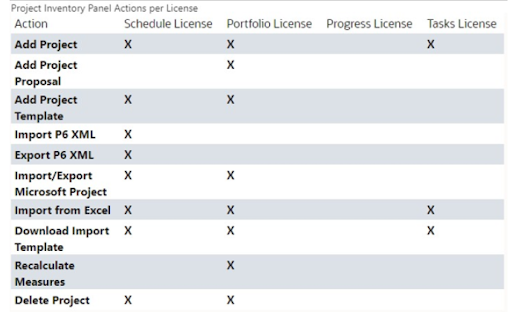
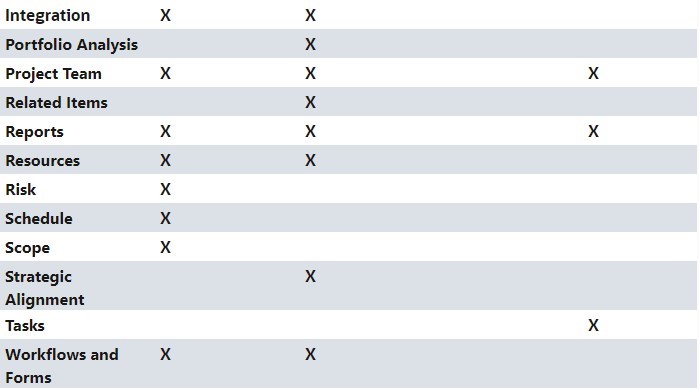
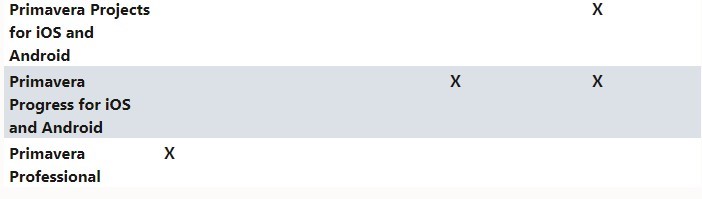
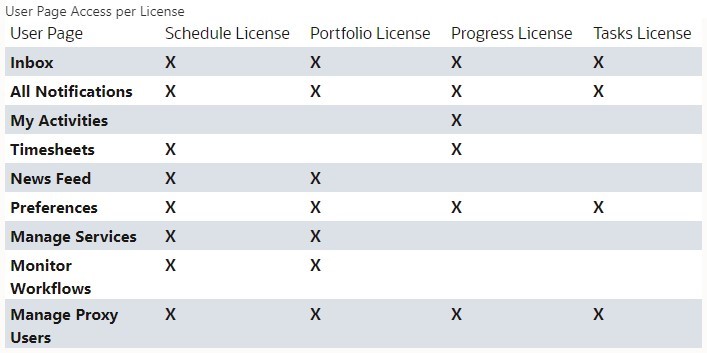
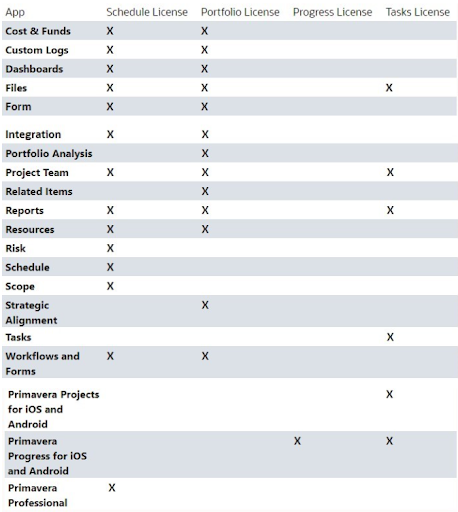
      The tables below highlight which apps, pages, functionality, and mobile apps come with which licenses. Users may still require additional security privileges before they can access the apps, pages, functionality, or mobile apps granted by their license assignment.

      additional security privileges
      user page access
      object selector action
      project inventory panel

      Ultimately, Oracle Primavera Cloud is known for its ability to enable managing projects effortlessly on Oracle’s Most Modern Project Management Platform. It’s both a modern and broader project management platform that is a market leader, which combines some very powerful and unique tools packaged neatly within it. The ultimate solution for anyone in the industry.

    • Types of Oracle Primavera Cloud Licenses

      Types of Oracle Primavera Cloud Licenses

      Oracle Primavera Cloud is for managing projects effortlessly on Oracle’s Most Modern Project Management Platform, it’s a most modern and broader project management platform in the market which still combines some very powerful and unique tools.

      Types of Licenses

      There are four licenses designed to meet the needs of your organization. Licenses determine what apps, pages, functionality, and mobile apps a user has access to.

      Schedule License: For power schedulers to prioritize, plan, manage, and evaluate projects across your organization.
      Portfolio License: For portfolio planners to propose and manage the portfolios across your organization.
      Progress License: For users who only need access to their activities and timesheets.
      Tasks License: For schedulers that use task management to manage their projects.

      Licenses are distributed according to the license model:

      • Licenses are distributed according to the license model:
      • If you have the Named Users license model, then you will assign available licenses to users.
      • If you have the Project license model, then all users will automatically receive the Schedule license, the Tasks license,
      • and the Progress license.
      • If you have the Enterprise Schedule license model, then all users will automatically receive the Schedule license, the Tasks license, and the Progress license.
      • If you have the Enterprise Portfolio Planning license model, then all users will automatically receive the Portfolio license.

      The tables below highlight which apps, pages, functionality, and mobile apps come with which licenses. Users may still require additional security privileges before they can access the apps, pages, functionality, or mobile apps granted by their license assignment.

      license assignment
      unctionality
      access the apps
       apps, pages, functionality
      Progress license